In today’s engaging learning and presentation environments, interactive platforms are key to capturing audience attention and fostering participation. Two popular contenders are Quizizz and uPresenter. While both aim to make interactions more dynamic, they cater to slightly different needs. Let’s dive into a comparison to help you decide which one is the better fit for you.
Quizizz: The Gamified Quiz Master
Think fun, engaging, and a little bit competitive! Quizizz is primarily known for its gamified quizzes and lessons. It injects excitement into learning with avatars, memes, leaderboards, and catchy music.

Key Features of Quizizz:
- Focus on Quizzes and Lessons: Primarily designed for formative assessment, review, and interactive lessons.
- Gamification Galore: Offers a highly engaging experience with points, power-ups, themes, and music.
- Variety of Question Types: Multiple choice, true/false, fill-in-the-blank, open-ended, polls, and more.
- Student-Paced and Live Modes: Offers flexibility for both individual practice and real-time classroom activities.
- Ready-Made Content: A vast library of user-created quizzes and lessons across various subjects.
- Detailed Reporting: Provides insights into student performance and understanding.
- Integration: Often integrates with popular learning management systems (LMS).
uPresenter: The Interactive Presentation Powerhouse
uPresenter takes a more holistic approach to interactive presentations. While it includes quizzing capabilities, it focuses on making entire presentations more engaging through various interactive elements.
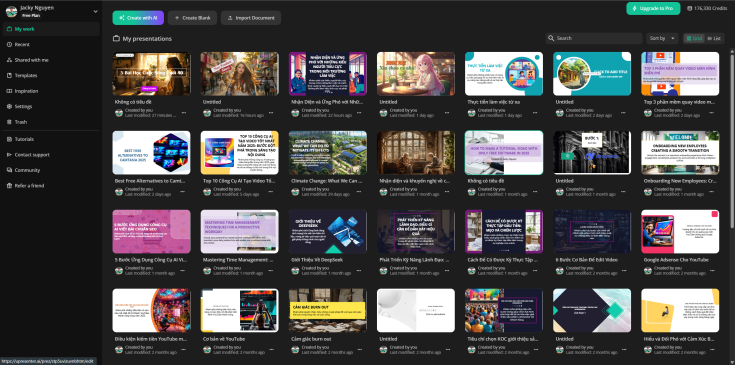
Key Features of uPresenter:
- Interactive Presentations: Designed to enhance live presentations with polls, Q&A, word clouds, and quizzes embedded directly within slides.
- Audience Participation Tools: Encourages real-time feedback and interaction from the audience.
- Diverse Interaction Options: Offers polls, Q&A sessions, quizzes, surveys, word clouds, and more.
- Seamless Integration with Presentations: Works alongside your existing presentation software (like PowerPoint or Google Slides).
- Real-time Feedback and Insights: Allows presenters to gauge audience understanding and adjust accordingly.
- Data Collection and Analytics: Provides valuable data on audience engagement and responses.
- Customization Options: Offers branding and customization features for a professional look.
Here’s a side-by-side comparison: Quizizz vs uPresenter
| Feature | Quizizz | uPresenter |
|---|---|---|
| Primary Use Case | Gamified quizzes, formative assessment, lessons | Interactive presentations, audience engagement |
| Question Types | Wide range, including polls and open-ended | Polls, Q&A, quizzes, word clouds, surveys |
| Gamification | Highly gamified with points, leaderboards, memes | Less emphasis on gamification, more on interaction |
| Presentation Focus | Primarily quiz/lesson focused | Designed to enhance entire presentations |
| Audience Pace | Student-paced and live modes | Primarily live, real-time interaction |
| Content Library | Extensive user-generated quiz library | Focus on presenter-created interactive elements |
| Reporting | Detailed quiz performance reports | Audience engagement and response analytics |
| Integration | Often integrates with LMS | Integrates with presentation software |
Who is it for?
- Choose Quizizz if:
- Your primary goal is to create fun and engaging quizzes and lessons for students or training participants.
- You want a platform with strong gamification elements to motivate learners.
- You need a large library of pre-made quizzes and the ability to easily create your own.
- You’re looking for a tool primarily focused on assessment and review.
- Choose uPresenter if:
- You want to make your presentations more interactive and engaging for your audience.
- You need a platform that seamlessly integrates with your existing presentation workflow.
- Your focus is on gathering real-time feedback, conducting polls, and facilitating Q&A during presentations.
- You want to enhance audience participation and understanding throughout your presentation.
Conclusion:
Both Quizizz and uPresenter are powerful interactive quizzes generators for enhancing engagement. Quizizz excels in creating fun and competitive learning experiences through gamified quizzes, while uPresenter shines in transforming static presentations into dynamic and interactive sessions. Your choice ultimately depends on your specific needs and the type of interaction you want to foster with your audience.
Consider trying out the free versions or trials of both platforms to see which one best aligns with your goals!
 Elearning Supporter
Leave a comment