In today’s fast-paced corporate world, the way businesses handle knowledge transfer can be the difference between a stagnant workforce and a high-performing team. Gone are the days when employee training meant flying staff to a conference room for a week of PowerPoint presentations and stale coffee.
As remote work becomes the norm and skill gaps widen, businesses are turning to digital solutions to keep their teams competitive. Enter the LMS.
If you have heard the acronym thrown around in management meetings but are still asking, “What is an LMS exactly?”—you are in the right place. This guide will break down the definition, the mechanics, and the undeniable reasons why your business needs one to survive and thrive in 2026.
What is an LMS? (The Definition)
LMS stands for Learning Management System.
At its core, an LMS is a software application or web-based technology used to plan, implement, and assess a specific learning process. It is the engine behind eLearning.
To understand it better, let’s break down the acronym:
- L (Learning): The primary purpose is to facilitate education, training, and knowledge retention.
- M (Management): It allows administrators to manage users, courses, instructors, and reporting. It organizes the chaos of training into a structured flow.
- S (System): It is a computerized system (often cloud-based SaaS) that automates the delivery of content.
Think of an LMS as your company’s “Online University.” Just as a university has a campus, classrooms, library, and registrar’s office, an LMS provides a virtual space where:
- Instructors upload content (videos, documents, quizzes).
- Learners (employees) access that content anytime, anywhere.
- Administrators track who has completed what and how well they performed.
Stop struggling with clunky software and start training with ease. uPresenter is a modern Learning Management System built for the future of work. Whether you are onboarding new hires or upskilling your team, uPresenter makes it intuitive and effective. Sign up now to experience the platform firsthand.
Types of LMS Deployments
Not all LMS platforms are created equal. Generally, they fall into two categories:
- Cloud-Based (SaaS): Hosted on the vendor’s server. You pay a subscription, log in via a browser, and start training. This is the most popular choice for modern businesses due to its scalability and low maintenance.
- Self-Hosted: Installed on your company’s own servers. This offers more control over data but requires a dedicated IT team to maintain and update.
Why Do You Need an LMS for Your Business?
You might be thinking, “We just use Google Drive folders and Zoom calls. Why pay for software?”
While manual methods work for teams of five, they break down rapidly as you scale. Without an LMS, training is inconsistent, tracking is a nightmare, and knowledge is lost whenever a senior employee leaves.

Here are the top 7 reasons why an LMS is essential for your business.
1. Drastic Reduction in Training Costs
Traditional training is expensive. You have to account for instructor fees, venue rentals, printed materials, travel expenses, and accommodation. With an LMS, you create the training material once and can distribute it to thousands of employees indefinitely.
- Zero Travel Costs: Employees learn from their desks or homes.
- Reusable Content: A video tutorial recorded today can be used for onboarding new hires for the next two years.
2. Centralized Knowledge Base
Is your company’s training material scattered across email threads, local hard drives, and sticky notes? An LMS organizes all your training content—videos, slide decks, PDFs, and compliance documents—in one centralized, secure location. This ensures that every employee, regardless of their location, has access to the same up-to-date version of the truth. No more confusion over outdated policies.
3. Streamlined Employee Onboarding
First impressions matter. A chaotic onboarding process can leave new hires feeling neglected and confused. An LMS allows you to automate the onboarding process. When a new hire starts, they are automatically enrolled in a “Welcome Path” covering company culture, tool tutorials, and compliance rules. They can progress at their own pace, freeing up HR managers to focus on human connection rather than repetitive paperwork.
4. Tracking and Reporting (The Power of Data)
How do you know if your employees actually read that safety manual? Without an LMS, you don’t. LMS platforms provide robust analytics. You can track:
- Completion Rates: Who finished the course?
- Time Spent: Did they skim it in 2 minutes or spend the required hour?
- Assessment Scores: Did they understand the material?
- Certifications: Are your staff’s licenses up to date?
This data is crucial for proving the ROI (Return on Investment) of your L&D (Learning and Development) efforts to stakeholders.
5. Compliance and Risk Management
For industries like finance, healthcare, or manufacturing, compliance is not optional—it is the law. An LMS is a lifesaver for compliance training. It can automatically notify employees when certifications are about to expire and require them to retake a course. If an audit occurs, you can instantly download a report proving that 100% of your staff completed the necessary regulatory training.
6. Flexibility and Accessibility (Mobile Learning)
The modern workforce is mobile. They want to learn on their commute, during downtime, or on the weekends. Most modern LMS platforms support mLearning (Mobile Learning). Employees can access courses via smartphones or tablets. This flexibility increases engagement rates significantly because learning fits into their flow of work, rather than interrupting it.
7. improved Employee Retention
LinkedIn’s Workplace Learning Report consistently shows that 94% of employees would stay at a company longer if it invested in their career development. Providing a structured learning path via an LMS shows your team that you care about their growth. It fosters a culture of continuous improvement, turning your company into a place where top talent wants to stay.
Key Features to Look for in an LMS
If you are convinced that you need an LMS, the next step is choosing the right one. The market is flooded with options, but a high-quality business LMS should include these core features:
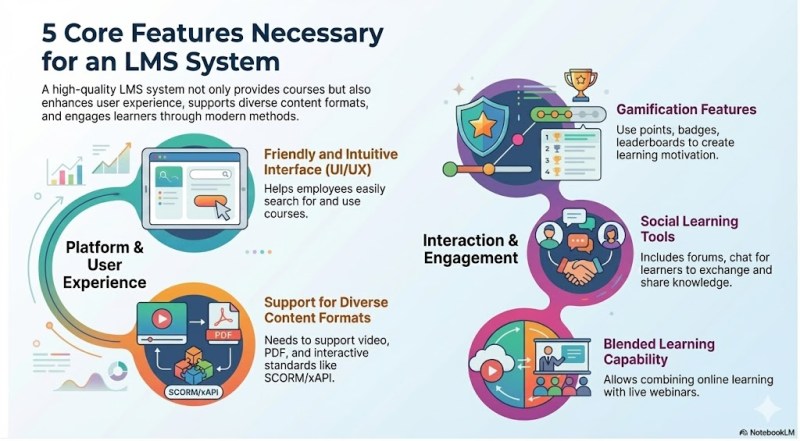
User-Friendly Interface (UI/UX)
If the system is clunky or difficult to navigate, your employees simply won’t use it. Look for an intuitive, clean interface (similar to Netflix or YouTube) that makes finding courses easy.
Support for Various Content Formats
Your LMS should support text, images, PDFs, and most importantly, video. It should also support industry standards like SCORM or xAPI, which allow you to import interactive courses created in authoring tools (like ActivePresenter, Articulate, or Adobe Captivate).
Gamification
Learning can be boring. Gamification features—such as points, badges, leaderboards, and certificates—tap into human psychology to make training more engaging and competitive.
Social Learning Tools
People learn from people. Good LMS platforms include discussion boards, chat features, or peer-review systems where learners can ask questions and share insights.
Blended Learning Capabilities
Sometimes you still need live training. An ideal LMS supports Blended Learning, allowing you to schedule live webinars (via Zoom/Teams integrations) alongside self-paced online modules.
Who Actually Uses an LMS?
It’s a common myth that LMS software is only for massive Fortune 500 companies. In reality, the user base is diverse:
- Small to Medium Businesses (SMBs): To scale training without hiring a full-time training department.
- Large Enterprises: To manage global compliance and standardize training across borders.
- Customer Education: Many tech companies use an LMS to train customers on how to use their software (Customer Onboarding), reducing the burden on support teams.
- Channel Partners: To train resellers and partners on product updates.
Top 5 Most Common LMS for Budget-Conscious Businesses
One of the biggest misconceptions about Learning Management Systems is that they require an enterprise-level budget. While premium platforms exist, many robust solutions are designed specifically for startups, SMBs, and organizations with limited resources.
If you are looking to implement an LMS without breaking the bank, here are 5 of the most common and effective budget-friendly options available in 2025:
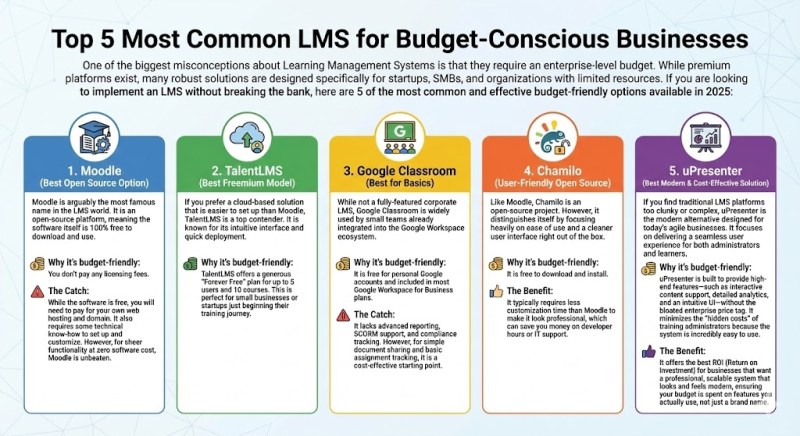
1. Moodle (Best Open Source Option)
Moodle is arguably the most famous name in the LMS world. It is an open-source platform, meaning the software itself is 100% free to download and use.
- Why it’s budget-friendly: You don’t pay any licensing fees.
- The Catch: While the software is free, you will need to pay for your own web hosting and domain. It also requires some technical know-how to set up and customize. However, for sheer functionality at zero software cost, Moodle is unbeaten.
2. TalentLMS (Best Freemium Model)
If you prefer a cloud-based solution that is easier to set up than Moodle, TalentLMS is a top contender. It is known for its intuitive interface and quick deployment.
- Why it’s budget-friendly: TalentLMS offers a generous “Forever Free” plan for up to 5 users and 10 courses. This is perfect for small businesses or startups just beginning their training journey.
3. Google Classroom (Best for Basics)
While not a fully-featured corporate LMS, Google Classroom is widely used by small teams already integrated into the Google Workspace ecosystem.
- Why it’s budget-friendly: It is free for personal Google accounts and included in most Google Workspace for Business plans.
- The Catch: It lacks advanced reporting, SCORM support, and compliance tracking. However, for simple document sharing and basic assignment tracking, it is a cost-effective starting point.
4. Chamilo (User-Friendly Open Source)
Like Moodle, Chamilo is an open-source project. However, it distinguishes itself by focusing heavily on ease of use and a cleaner user interface right out of the box.
- Why it’s budget-friendly: It is free to download and install.
- The Benefit: It typically requires less customization time than Moodle to make it look professional, which can save you money on developer hours or IT support.
5. uPresenter (Best Modern & Cost-Effective Solution)
If you find traditional LMS platforms too clunky or complex, uPresenter is the modern alternative designed for today’s agile businesses. It focuses on delivering a seamless user experience for both administrators and learners.
- Why it’s budget-friendly: uPresenter is built to provide high-end features—such as interactive content support, detailed analytics, and an intuitive UI—without the bloated enterprise price tag. It minimizes the “hidden costs” of training administrators because the system is incredibly easy to use.
- The Benefit: It offers the best ROI (Return on Investment) for businesses that want a professional, scalable system that looks and feels modern, ensuring your budget is spent on features you actually use, not just a brand name.
Conclusion: Is an LMS Right for You?
If your business is growing, if you are struggling to keep track of who knows what, or if you want to build a culture of learning that attracts top talent, the answer is a resounding yes.
Investing in a Learning Management System is not just about buying software; it’s about investing in your company’s intellectual capital. It transforms training from a logistical headache into a strategic advantage.
Ready to take the next step? Start by auditing your current training gaps. Once you identify what you are missing, look for an LMS that offers a free trial so you can test the user experience before committing. Your employees—and your bottom line—will thank you.
 Elearning Supporter
Leave a comment