Are you feeling overwhelmed by the sheer number of software options available for creating online training? You are not alone. In the rapidly expanding world of digital education, selecting the right eLearning authoring tool is one of the most critical decisions a trainer or Instructional Designer can make.
Choosing the wrong software can lead to wasted budget, frustration with technical glitches, and courses that look outdated before they are even published. Conversely, the right tool empowers you to create engaging, interactive, and professional content with ease.

In this guide, we will cut through the noise. We will explore exactly what you need to look for, the differences between tool types, and reveal a solution that combines power with cost-effectiveness. By the end of this article, you will have a clear path to selecting the perfect software for your team.
What is an eLearning Authoring Tool?
Before we dive into features, let’s simplify the definition. An eLearning authoring tool is a software application that allows you to create digital training content.
Unlike a standard presentation tool (like PowerPoint), an authoring tool allows you to:
- Integrate multimedia (video, audio, screen recordings).
- Create interactivity (quizzes, drag-and-drop, games).
- Export content in specific formats (like SCORM or xAPI) that can be tracked by a Learning Management System (LMS).
In short, if you want to know who took your course and how well they performed, you need an authoring tool, not just a slideshow maker.
Cloud-Based vs. Desktop: Making the Strategic Choice
When searching for software, you will generally face two categories: Cloud-based (SaaS) and Desktop applications.
Cloud-Based Tools
These run in your web browser. They are great for quick collaboration between teams in different locations. However, they often rely heavily on your internet speed. If your connection drops, your work might be paused. Furthermore, they usually operate on a monthly subscription model, which can become very expensive over time.
The Power of Desktop Applications
Many professional designers still prefer the best desktop elearning authoring tool they can find. Why?
- Stability: You do not need an internet connection to work. You can build courses on a plane or in a remote area.
- Performance: Desktop apps utilize your computer’s full processing power, which is essential for heavy tasks like video editing and high-quality screen recording.
- Security: Your raw files stay on your local machine until you are ready to publish.
If you value speed, privacy, and avoiding recurring monthly fees, a desktop solution is often the smarter financial choice.
5 Critical Features Your Tool Must Have
Not all software is created equal. To ensure you get the best value, your chosen eLearning authoring tool should check these five boxes:
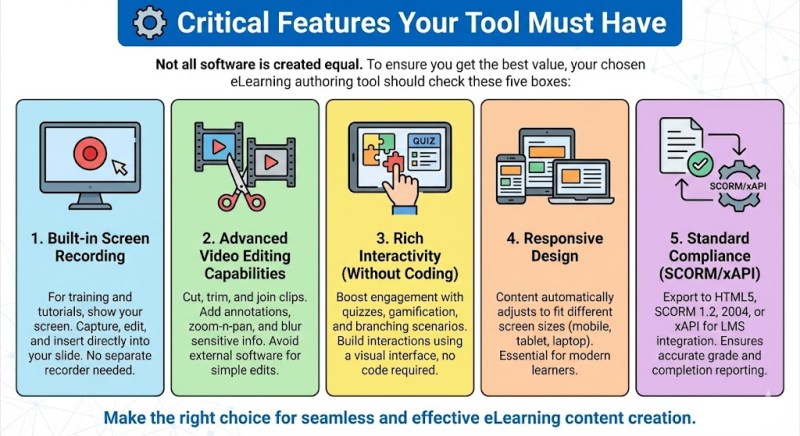
1. Built-in Screen Recording
For software training, tutorials, or compliance guides, you often need to show your screen. Many authoring tools require you to buy a separate screen recorder. The ideal tool should have this feature built-in, allowing you to record, edit, and insert the capture directly into your slide.
2. Advanced Video Editing Capabilities
Video is the king of content. However, simply importing a video isn’t enough. You need the ability to:
- Cut, trim, and join video clips.
- Add annotations and zoom-n-pan effects.
- Blur sensitive information. If your authoring tool forces you to use external video editing software (like Premiere Pro or Camtasia) just to make simple edits, it creates a disconnected and slow workflow.
3. Rich Interactivity (Without Coding)
Learner engagement drops when courses are just “click next to continue.” Look for tools that offer:
- Quizzes: Multiple choice, fill-in-the-blank, true/false.
- Gamification: Drag-and-drop interactions.
- Branching Scenarios: Where the course changes based on the learner’s choices. Ideally, the software should allow you to build these interactions using a visual interface, rather than requiring you to write computer code.
4. Responsive Design
Your learners will use mobile phones, tablets, and laptops. A modern authoring tool must automatically adjust the content to fit different screen sizes. This is often called “Responsive Design.”
5. Standard Compliance (SCORM/xAPI)
This is non-negotiable for corporate training. The tool must be able to export to HTML5, SCORM 1.2, SCORM 2004, or xAPI (Tin Can). This ensures that when you upload the course to your LMS, the grades and completion status are reported correctly.
The “All-in-One” Solution: Why We Recommend ActivePresenter
After testing dozens of tools over the last decade, we frequently encounter a common problem: most tools are good at one thing but bad at others. Some are great for quizzes but terrible for video. Others are great video editors but cannot export SCORM.
This is where Atomi ActivePresenter stands out as a unique and powerful exception.
We recommend ActivePresenter as a top-tier solution because it is not just an authoring tool; it is a three-in-one powerhouse:
1. Professional Screen Recording
ActivePresenter creates high-quality screen recordings. Unlike other tools that just record a flat video, ActivePresenter can record in “Smart Capture” mode. This means it detects your mouse clicks and keystrokes, automatically creating separate slides for each step. It is incredibly efficient for creating software simulations.
2. A Full-Featured Video Editor
You do not need to buy separate video editing software. ActivePresenter includes a timeline-based editor that rivals dedicated video tools. You can use Green Screen (Chroma Key), Audio Fade, Zoom-n-Pan, and text-to-speech features all within the same app.
3. Advanced eLearning Authoring
This is where it shines. You can convert your PowerPoint slides or recorded videos into fully interactive HTML5 courses. It supports advanced logic (Events and Actions) which allows you to create complex games and scenarios without being a programmer.
The “Free & Powerful” Advantage
Most competitors offer a 30-day trial with heavy watermarks or blocked features. ActivePresenter offers a Free Edition that is surprisingly generous. It includes all the recording and editing features without a time limit. You can use it as long as you want. This makes it the perfect entry point for beginners or teams with tight budgets who still require professional results.
Step-by-Step: How to Choose Your Tool Today
To finalize your decision, follow this simple workflow:
- Define Your Primary Goal: Are you making simple quizzes (use a basic tool) or video-heavy tutorials (use a tool with strong video editing)?
- Check Your Budget: Can you afford a $1,000/year subscription? If not, look for perpetual licenses (one-time buy) like those offered by ActivePresenter.
- Test the Workflow: Do not just look at the feature list. Download the trial version. Try to record your screen, add a button, and export the file.
Conclusion
Finding the right eLearning authoring tool does not have to be a headache. While there are many options on the market, the best tool is one that balances ease of use with deep functionality.
You need a tool that grows with you—one that handles simple screen recording today but can handle complex interactive courses tomorrow. For its versatility, robust video editing capabilities, and cost-effective licensing model, ActivePresenter remains our top recommendation for both new creators and seasoned professionals.
Ready to transform your training content? Don’t just take our word for it. Experience the power yourself. [Download Atomi ActivePresenter Free Edition Here] and start creating your first interactive course today.
 Elearning Supporter
Leave a comment