You have spent weeks designing the perfect eLearning course. The script is engaging, the videos are crisp, and the quizzes are challenging. Now, you are at the finish line, ready to export your project from your Scorm creation software to upload it to your Learning Management System (LMS).
But then, you are hit with a technical question that makes many instructional designers hesitate: “Should I export to SCORM 1.2 or SCORM 2004?”
It might seem like a small dropdown menu choice, but picking the wrong standard can lead to frustrated learners, lost progress data, and completion status errors. As someone who has navigated the eLearning landscape for over 10 years, I know that understanding this difference is key to a smooth course rollout.
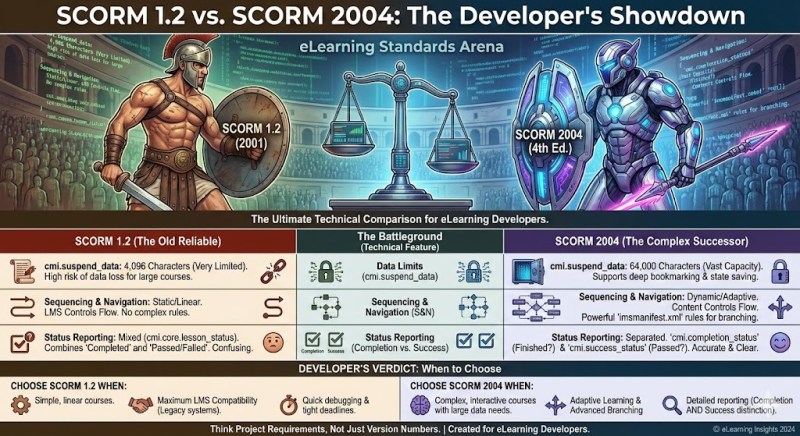
In this guide, we will break down the technical jargon into simple terms, compare the two standards, and show you how to handle them effortlessly using the best desktop elearning authoring tool available today.
What is SCORM and Why Do You Need It?
Before we dive into the version war, let’s briefly clarify what SCORM is.
SCORM stands for Shareable Content Object Reference Model. Think of it as a universal language that allows your eLearning content (the course you built) to talk to your LMS (the platform where learners access the course).
Without SCORM, your LMS wouldn’t know:
- If a learner opened the course.
- How much time they spent on it.
- Whether they passed or failed the quiz.
- Where they stopped so they can resume later.
Any professional Scorm creation software will give you the option to publish to this standard. However, the version you choose dictates how much and how well that data is communicated.
The 3 Critical Differences: SCORM 1.2 vs. SCORM 2004
While there are many technical nuances, for the average course creator, the difference boils down to three main areas: Data Limits, Status Reporting, and Sequencing.
1. The “Suspend Data” Limit (The Big Deal)
This is the most significant pain point for developers using Scorm creation software.
“Suspend Data” is the bookmarking information the course sends to the LMS. It tracks exactly where the learner left off, which slides they viewed, and their answers to specific interactions.
- SCORM 1.2: Has a limit of only 4,096 characters.
- SCORM 2004 (3rd & 4th Edition): Increases this limit to 64,000 characters.
Why does this matter?
Imagine you have created a massive, interactive course with 100 slides and a complex final exam. As the learner progresses, the course generates a string of text code (data) to track their journey.
If you export to SCORM 1.2, once that string hits 4,096 characters, the LMS stops recording new data. When the learner returns the next day, the course might force them to restart from the beginning or lose their quiz answers because the “memory” was full.
Pro Tip: If you are building a “micro-learning” module (5-10 minutes), SCORM 1.2 is fine. For long, gamified courses, SCORM 2004 is safer.
2. Status Separation: “Completed” vs. “Passed”
How do you define success in your course? Is it simply viewing all the slides, or is it scoring 80% on a test?
- SCORM 1.2: Only allows for one status to be stored in the cmi.core.lesson_status field. You usually have to choose between pairs like “Passed/Incomplete” or “Completed/Incomplete.” It struggles to report that a learner has both completed the content AND passed the test.
- SCORM 2004: Separates these into two distinct buckets:
- Completion Status: Did they view the content? (Completed/Incomplete)
- Success Status: Did they pass the assessment? (Passed/Failed)
This separation gives you much richer reporting data in your LMS.
3. Sequencing and Navigation
SCORM 2004 introduced a feature called “Simple Sequencing.” This allows the Scorm creation software to define rules that control the learner’s path outside of the content itself.
For example, with SCORM 2004, you can tell the LMS: “If the learner fails the quiz in Module 1, do not let them open Module 2; force them to review Module 1 again.” SCORM 1.2 generally relies on the course content itself to handle this logic, which can be less secure.
Comparison Table at a Glance
To make your decision easier, here is a quick comparison:
| Feature | SCORM 1.2 | SCORM 2004 (3rd/4th Ed) |
| Release Date | 2001 (Old but reliable) | 2004 (Newer standard) |
| Data Storage (Resume) | 4,096 characters (Very low) | 64,000 characters (High) |
| Status Reporting | Single status (e.g., Passed OR Completed) | Dual status (Completion AND Success) |
| Sequencing | No native support | Robust sequencing rules |
| LMS Compatibility | Supported by 99% of LMSs | Supported by most modern LMSs |
Which Standard Should You Choose?
The decision largely depends on two factors: your LMS and your Course Complexity.
Choose SCORM 1.2 if:
- You are using a very old or legacy LMS that does not fully support 2004.
- Your course is simple, linear, and short (under 15 minutes).
- You do not need detailed reporting on quiz scores separate from completion.
Choose SCORM 2004 if:
- You are creating a long, comprehensive course with many interactions.
- You need detailed tracking (e.g., knowing a user finished the slides but failed the test).
- You are using a modern Scorm creation software and a modern LMS.
ActivePresenter: The Best Desktop eLearning Authoring Tool for SCORM
Now that you understand the standards, you need a tool that makes publishing to either of them simple. This is where Atomi ActivePresenter shines.
While there are many tools on the market, ActivePresenter stands out as the best desktop elearning authoring tool for both beginners and pros. It is not just a video editor; it is a full-featured eLearning powerhouse.
Why ActivePresenter is the Ultimate Solution?
1. All-in-One Powerhouse
Most Scorm creation software focuses on just one thing: slides. ActivePresenter allows you to record your screen (perfect for software simulations), edit the video with a timeline editor, add interactive quizzes, and then export to SCORM. You don’t need three different apps; you just need one.
2. Smart “Suspend Data” Compression
Worried about that SCORM 1.2 character limit? ActivePresenter has optimized its export engine to compress the data sent to the LMS. This means you can create slightly longer courses in SCORM 1.2 without hitting the limit as quickly as you might with other tools.
3. Unbeatable Value (Free & Powerful)
This is the biggest selling point. ActivePresenter offers a Free Edition that is incredibly capable. Unlike competitors that lock SCORM export behind expensive subscriptions, ActivePresenter allows you to test and utilize many features freely. For professional distribution without watermarks, the paid license is a fraction of the cost of Articulate or Adobe Captivate.
Step-by-Step: Exporting SCORM with ActivePresenter
Creating a SCORM package in ActivePresenter is incredibly intuitive. Here is how you can do it:
- Open your Project: Finish designing your slides and quizzes in ActivePresenter.
- Go to the Export Tab: On the top ribbon, click the Export tab.
- Select SCORM/xAPI: Click the icon labeled Publish LMS.
- Choose Your Standard:
- In the pop-up window, look for the LMS Standard section.
- Click the dropdown and select either SCORM 1.2 or SCORM 2004.
- Configure Options:
- You can set the Pass Condition (e.g., “Top Layer” or “Specific Operation”).
- Define the Report Method (Pass/Fail or Complete/Incomplete).
- Export: Click OK. ActivePresenter will wrap your entire course into a ZIP file ready for upload.
Conclusion
Choosing between SCORM 1.2 and SCORM 2004 doesn’t have to be a headache. It is simply a choice between maximum compatibility (1.2) and maximum data tracking (2004).
However, the most important choice you will make is the software you use to build the content. You need a Scorm creation software that is flexible, easy to use, and technically robust.
ActivePresenter offers the perfect balance. Whether you are recording a software demo or building a complex quiz, it handles the heavy lifting of SCORM compliance for you.
Ready to create your first SCORM course?
Don’t just take my word for it. Download ActivePresenter today to experience the power of a professional eLearning authoring tool. It’s free to start, and it might just be the last tool you ever need.
 Elearning Supporter
Leave a comment