In the rapidly evolving world of digital education, finding the right tools can feel like navigating a minefield. Instructional designers and educators are often forced to choose between two extremes: expensive, high-end suites that drain budgets with recurring subscriptions, or free tools that lack essential features.
If you are looking for a robust eLearning software that balances professional capabilities with affordability, you have likely encountered names like Articulate Storyline or Adobe Captivate. However, there is one contender that consistently punches above its weight class: ActivePresenter 10.
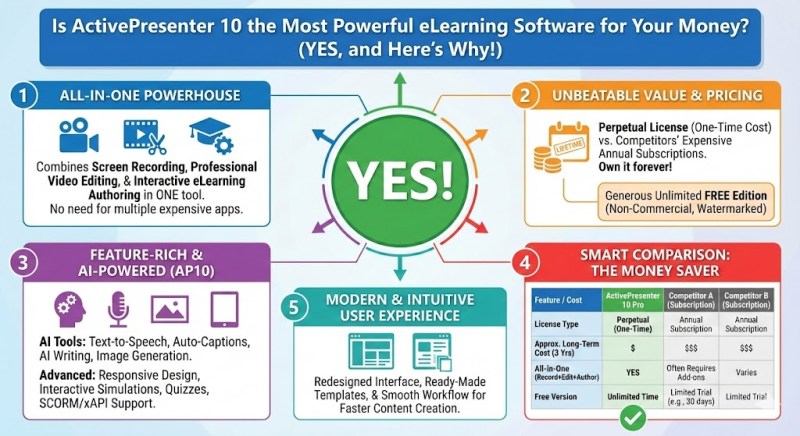
In this article, I will dive deep into why this all-in-one tool might just be the smartest investment for your training budget this year. We will explore its features, its unique “3-in-1” architecture, and why it stands out as one of the best desktop eLearning authoring tools available today.
Defining “Power” in Modern eLearning Software
Before we analyze the software itself, we must define what makes an eLearning software “powerful” in the current landscape. Gone are the days when a simple “Next” button and a few text slides were sufficient. Today, learners demand:
- High-Quality Video Content: Tutorials and screencasts must look professional.
- Deep Interactivity: Branching scenarios, drag-and-drop interactions, and gamification.
- Responsive Design: Courses must work seamlessly on mobile devices.
- Cost-Efficiency: The tool must provide a high Return on Investment (ROI).
Many tools specialize in just one of these areas. Video editors are great for video but bad for quizzes. Authoring tools are great for quizzes but terrible for video editing. This is where ActivePresenter 10 changes the game.
The ActivePresenter 10 Advantage: The “3-in-1” Solution
What separates ActivePresenter from the competition is that it is not just an authoring tool; it is a complete ecosystem. It integrates three distinct software categories into a single interface.
1. Advanced Screen Recording (Beyond Basic Capture)
If you are creating software simulations or IT training, screen recording is non-negotiable. While many eLearning software options offer basic recording, ActivePresenter 10 operates on a different level.
- Smart Capture Technology: Unlike standard video recording, ActivePresenter can record your screen as individual slides based on your mouse clicks and keystrokes. This allows you to edit the text in a caption, change the mouse cursor path, or even translate the simulation after you have recorded it.
- Full-Motion Recording: For more traditional video needs, it records crystal-clear full-motion video (up to 4K quality) along with system audio and microphone narration simultaneously.
- Webcam Integration: You can easily record your webcam alongside your screen, adding a personal touch to your lectures, which is crucial for learner engagement.
2. Professional Video Editing (No External Software Needed)
Usually, after recording a screen, an instructional designer has to export the file and import it into expensive software like Adobe Premiere or Camtasia to edit it. ActivePresenter 10 eliminates this step.
It includes a fully-featured audio/video editor built right into the timeline. You can perform complex tasks such as:
- Cut, Split, and Join: Basic trimming is fast and intuitive.
- Chroma Key (Green Screen): Remove backgrounds for professional presenter videos.
- Blur & Spotlight: Hide sensitive data or highlight key areas of the screen to guide learner focus.
- Text-to-Speech: Convert text into lifelike speech using integration with Google, Microsoft, and Amazon cloud voices.
By having these features inside your eLearning software, you save not only money on additional licenses but also significant time in your workflow.
3. Interactive eLearning Authoring (The Core Strength)
This is where ActivePresenter 10 truly shines as one of the best desktop eLearning authoring tools. It allows you to transform static content into immersive learning experiences.
- Responsive Design: ActivePresenter uses a “Flex Box” system. This ensures that your content automatically adjusts to fit different screen sizes (desktop, tablet, mobile) without you having to create three separate versions of the same course.
- Interactivity & Events: You can create complex branching scenarios. For example, if a user clicks Button A, they go to Slide 3; if they click Button B, a video plays. The “Event-Action” system requires no coding knowledge but offers immense logical power.
- Quizzing & Assessment: It supports over 10 distinct types of questions (Multiple Choice, True/False, Fill in Blank, Drag-n-Drop, etc.).
- SCORM & xAPI Export: Once your course is ready, you can export it to HTML5, SCORM 1.2, SCORM 2004, or xAPI (Tin Can API). This guarantees compatibility with almost any Learning Management System (LMS) like Moodle, Canvas, or TalentLMS.
Is It Worth the Money? (The Financial Breakdown)
When evaluating eLearning software, the price tag is often the deciding factor.
Most industry leaders have shifted to a Subscription Model (SaaS). This means you never truly own the software; you rent it. If you stop paying $1,000+ per year, you lose access to your tool.
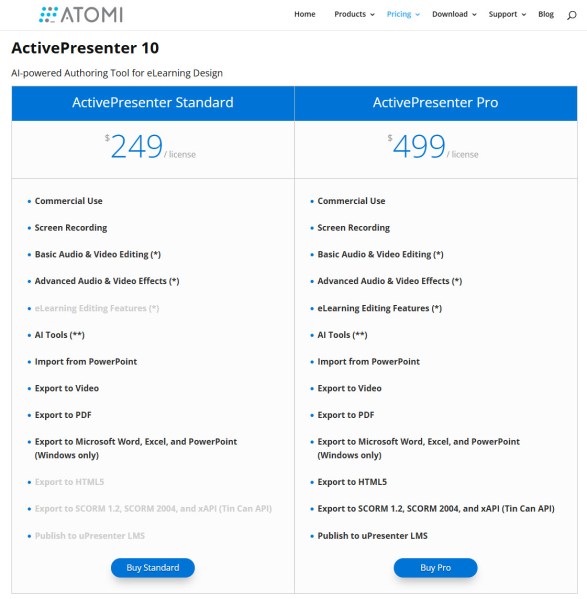
ActivePresenter 10 uses a Perpetual License model.
- You pay once, and you own it forever.
- The cost of a Standard or Pro license is significantly lower than a single year’s subscription to competitors like Articulate 360 or Adobe Captivate.
- Students and educational institutions often receive further discounts.
The “Free” Version Secret: Unlike other tools that give you a 30-day trial, ActivePresenter offers a Free Edition. This edition includes almost all the features of the paid versions. It has no time limit. You can use it to create video tutorials and export them to MP4 without watermarks (mostly). The only limitation usually comes when using advanced interactive features for HTML5 export, which may add a watermark until you activate a license.
This makes it the perfect entry point for freelancers or companies testing the waters. Added to that, you can find exclusive discount coupons of ActivePresenter here too!
The Top 3 Unique Selling Points (USP)
Why should you choose ActivePresenter over other best desktop eLearning authoring tools? Here is my professional verdict:
- Versatility: It is the Swiss Army Knife of instructional design. You do not need a separate screen recorder, video editor, and authoring tool. It is all there.
- Performance: As a desktop application, it is stable and fast. It handles heavy projects with large video files much better than cloud-based authoring tools, which can lag or crash if your internet connection is unstable.
- No “Subscription Fatigue”: In an era where every piece of software requires a monthly fee, ActivePresenter’s one-time payment structure is a breath of fresh air for budget management.
Conclusion: The Final Verdict
So, is ActivePresenter 10 the most powerful eLearning software for your money?
Yes.
While it may have a slightly steeper learning curve than some simplistic cloud-based tools, the payoff is immense. You gain the ability to create anything from a simple video tutorial to a complex, gamified, responsive eLearning course—all without breaking the bank.
If you are serious about creating high-quality training materials and want a tool that grows with your skills, ActivePresenter is the logical choice.
Ready to take your eLearning to the next level?
Don’t just take my word for it. Since the software allows you to test it extensively, I recommend you experience it yourself.
[Download ActivePresenter Free Edition Here] and start building your first interactive course today.
 Elearning Supporter
Leave a comment