I. Introduction: The Evolving Landscape of Learning
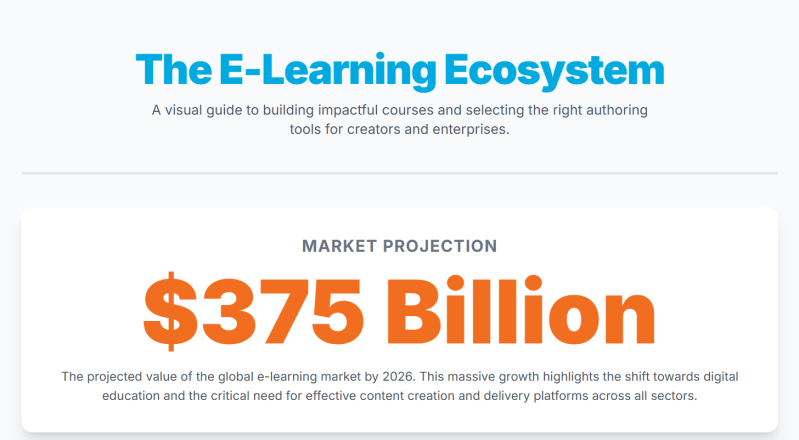
In today’s fast-paced world, continuous learning is not just an advantage, but a necessity. From upskilling employees to educating global audiences, the demand for accessible and effective knowledge transfer has never been higher. E-learning has emerged as the most flexible, scalable, and often cost-effective solution to meet this demand, transforming how we acquire and share information.
This comprehensive guide is designed to empower two key groups navigating the e-learning landscape:
- Individual Creators/Small Businesses: If you’re an educator, trainer, consultant, or small business owner looking to build impactful online courses for your audience or internal teams, this section will provide you with the foundational principles and practical advice you need to get started.
- Enterprises: For organizations aiming to streamline their corporate training, onboarding, compliance, and knowledge transfer through robust e-learning solutions, we’ll delve into the strategic considerations and essential features for selecting the perfect authoring tool.
Throughout this post, you’ll learn how to effectively build engaging e-learning courses and what to consider when selecting the best authoring tools to suit your specific needs, whether you’re creating a single course or managing a vast corporate training program.
II. For the Course Creator: Crafting Engaging E-learning Experiences
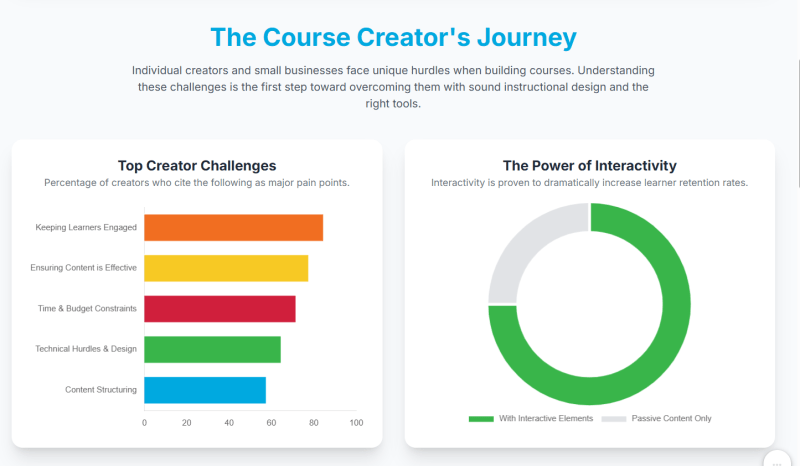
The journey of creating an e-learning course can seem daunting. Many individual creators and small businesses face common challenges:
- “Where do I start?” The sheer volume of content and the task of structuring it into a coherent, logical flow can be overwhelming.
- Keeping learners engaged and motivated: How do you ensure your audience stays interested from start to finish, especially in a self-paced online environment?
- Ensuring content is effective: Beyond just delivering information, how do you guarantee your course leads to desired learning outcomes and real-world application?
- Technical hurdles and design limitations: Without a background in graphic design or programming, creating professional-looking and interactive content can feel out of reach.
- Budget and time constraints: Small teams and individuals often operate with limited resources, making efficient and affordable solutions crucial.
B. Key Principles for Effective E-learning Design:
Overcoming these challenges begins with understanding core instructional design principles:
- Define Clear Learning Objectives: Before you even think about content, ask yourself: What should learners know or be able to do after completing this course? Clear, measurable objectives guide your content creation and assessment strategies.
- Instructional Design Basics:
- Chunking content: Break down complex topics into digestible, bite-sized modules or lessons. This prevents cognitive overload and makes learning more manageable.
- Using varied media: Don’t just rely on text. Incorporate a rich mix of video explanations, audio narrations, engaging images, infographics, and interactive diagrams to cater to different learning styles and maintain interest.
- Incorporating storytelling and real-world examples: People connect with stories. Use case studies, anecdotes, and practical scenarios to make abstract concepts relatable and demonstrate their real-world relevance.
- Interactivity is King: Passive learning leads to disengagement. Integrate interactive elements like quizzes, drag-and-drop activities, clickable hotspots, simulations, and branching scenarios that allow learners to make choices and see consequences. This active participation deepens understanding and retention.
- Accessibility Matters: Design your course with all learners in mind. This includes providing captions for videos, alt text for images, keyboard navigation options, and ensuring sufficient color contrast.
- Feedback and Assessment: How will learners know if they’re grasping the material? Provide opportunities for self-assessment (e.g., practice quizzes) and constructive feedback on their performance. This helps reinforce learning and identify areas for improvement.
C. How Authoring Tools Empower You:
This is where e-learning authoring tools become indispensable. They are the software platforms that allow you to create, package, and publish your online courses. A good authoring tool can:
- Simplify complex design tasks: Many tools come with pre-built templates, themes, and asset libraries, allowing even non-designers to create professional-looking content quickly.
- Enable non-designers to create professional-looking content: Drag-and-drop interfaces and intuitive workflows mean you don’t need coding skills to build engaging interactions.
- Streamline the publishing process: Once your course is complete, authoring tools handle the technicalities of exporting it into industry-standard formats like SCORM, xAPI, or HTML5, making it compatible with most Learning Management Systems (LMS).
For individual creators and small businesses, a tool like ActivePresenter stands out. ActivePresenter offers a powerful yet user-friendly interface that combines screen recording, video editing, and e-learning authoring capabilities. You can easily capture software demonstrations, create interactive quizzes, add rich media, and publish your courses to various formats, making it an excellent all-in-one solution for crafting engaging e-learning experiences without needing multiple software applications. Its robust features for simulations and interactive elements are particularly beneficial for practical, skill-based courses.

III. For the Enterprise: Selecting the Right E-learning Authoring Tool
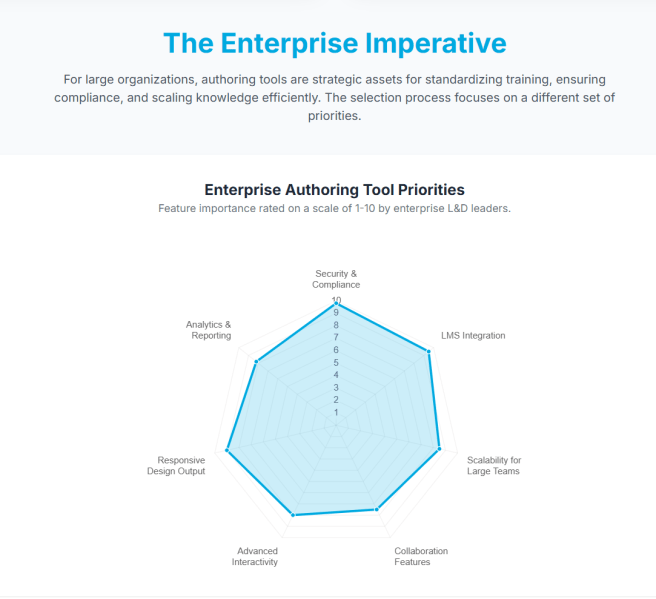
For enterprises, e-learning authoring tools are not just about creating courses; they are strategic investments that impact efficiency, consistency, and scalability across the organization.
A. The Strategic Importance of Authoring Tools:
- Standardizing training content: Ensure all employees receive consistent, high-quality information regardless of their location or department.
- Reducing reliance on external vendors: Empower internal teams to create and update training content, increasing agility and reducing costs associated with third-party development.
- Ensuring compliance and consistent messaging: Critical for regulatory training, onboarding, and disseminating company-wide policies.
- Scaling training initiatives efficiently: Easily deploy training to thousands of employees across different regions without significant logistical hurdles.
B. Core Challenges in Tool Selection:
Despite the clear benefits, selecting the right enterprise authoring tool presents its own set of challenges:
- Navigating a crowded market: The sheer number of tools available, each with its unique feature set, can be overwhelming.
- Integration with existing Learning Management Systems (LMS): The chosen tool must seamlessly integrate with your current LMS to ensure smooth content delivery and tracking.
- Ensuring scalability: The tool must be able to handle the volume and complexity of content required for a large, diverse workforce.
- Security, data privacy, and compliance requirements: Protecting sensitive company data and adhering to industry regulations (e.g., GDPR, HIPAA) is paramount.
- User adoption and training: Ensuring that internal content creators can effectively use the chosen tool requires adequate training and support.
- Justifying Return on Investment (ROI): Demonstrating the tangible benefits and cost savings of the tool to stakeholders is crucial for long-term commitment.
C. Essential Features to Look for in an Enterprise Authoring Tool:
When evaluating enterprise-grade authoring tools, prioritize features that address your organization’s specific needs and challenges:
- User-Friendliness & Collaboration: Look for an intuitive interface that reduces the learning curve for your team. Features like multi-user editing, version control, and review functionalities are essential for collaborative content development.
- Content Creation Capabilities:
- Rich media support: Robust capabilities for embedding and editing video, audio, animations, and high-resolution images.
- Advanced interactivity: Support for complex simulations (e.g., software training, decision-making scenarios), virtual reality (VR), and augmented reality (AR) integration for immersive learning experiences.
- Responsive design: The ability to automatically adapt course content for optimal viewing on any device (desktop, tablet, mobile) is non-negotiable.
- Extensive asset libraries and templates: Pre-built assets, characters, scenarios, and templates can significantly speed up development time and ensure brand consistency.
- Output & Integration:
- SCORM, xAPI, LTI compliance: These industry standards ensure your courses can communicate effectively with virtually any modern LMS, tracking learner progress and completion data.
- Flexible publishing options: Ability to publish to web, mobile apps, or even offline formats.
- Analytics & Reporting: Built-in tracking for learner progress, quiz results, and course effectiveness provides valuable insights for continuous improvement.
- Customization & Branding: The tool should allow for extensive customization to align courses with your corporate identity, including logos, color schemes, and fonts.
- Support & Training: Comprehensive documentation, responsive customer support, and an active community forum are crucial for long-term success.
- Security & Compliance: Features like data encryption, granular user roles and permissions, and adherence to relevant data privacy regulations are vital.
ActivePresenter, while highly beneficial for individual creators, also offers features that make it a compelling choice for enterprises. Its comprehensive suite for creating interactive simulations, robust SCORM/xAPI output, and powerful video editing capabilities can meet many corporate training needs. Its perpetual license model can also be an attractive alternative to subscription-based tools for long-term budget planning, allowing enterprises to own the software outright.
IV. The Synergy: Bridging Course Creation and Tool Selection
Ultimately, whether you’re an individual course creator or an enterprise, the shared goal is to create impactful, engaging, and effective e-learning experiences that drive desired outcomes.
- Instructional Design Remains Paramount: No tool, however advanced, can replace sound instructional design principles. The best software merely amplifies well-designed content. Focus on your learning objectives and learner experience first.
- Scalability for All: Authoring tools, like ActivePresenter, empower both small and large entities to scale their learning initiatives, reaching wider audiences or more employees efficiently.
- Future Trends: The e-learning landscape is constantly evolving. Keep an eye on emerging trends such as AI-powered content generation (which can assist with scriptwriting or content summarization), immersive learning (VR/AR for realistic simulations), and personalized learning paths (adaptive content based on learner performance).
V. Conclusion: Empowering Your Learning Journey
E-learning success hinges on a powerful combination: a deep understanding of your audience, the application of sound instructional design principles, and the strategic leveraging of the right authoring tools.
Whether you’re embarking on building your very first online course or optimizing a complex enterprise-wide training program, the right approach and tools can transform your learning outcomes, engage your audience, and achieve your educational goals.
Ready to start building your next great e-learning course? Explore powerful tools like ActivePresenter, designed to help you create professional, interactive, and effective learning content for every scale.
 Elearning Supporter
Leave a comment