In the rapidly evolving world of Learning and Development (L&D), staying current with technology standards is not just a trend, it is a necessity. For years, the eLearning industry has been fueled by an alphabet soup of acronyms, causing confusion for instructional designers and educators alike. The biggest debate today centers on two major standards: the reliable veteran, SCORM, and the agile newcomer, xAPI (formerly Tin Can API).
If you are an instructional designer, you have likely faced the limitation of old tracking methods. You want to know more than just “Did they pass?” You want to understand how they learned.
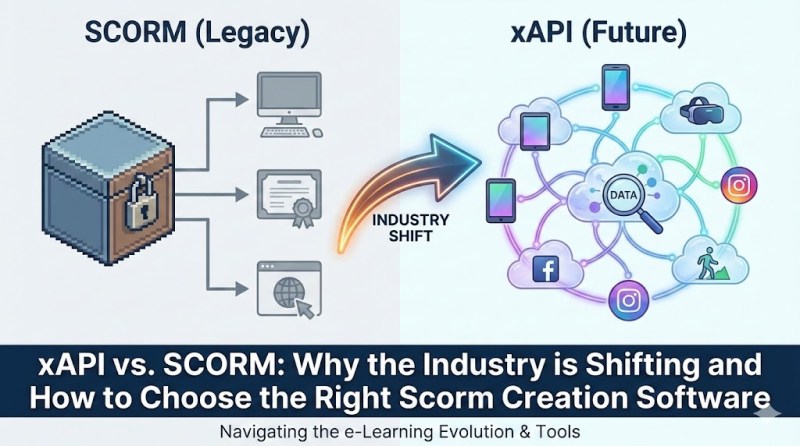
This article will break down the technical differences between these standards, explain why the industry is migrating toward data-rich experiences, and guide you in selecting the right Scorm creation software that can handle both the past and the future of eLearning.
What is SCORM? The “Old Reliable” Standard
Before we dive into the shift, we must understand the foundation. SCORM stands for Shareable Content Object Reference Model. Originally developed in the late 1990s and early 2000s by the ADL (Advanced Distributed Learning) Initiative, SCORM was created to solve a massive problem: interoperability.
Before SCORM, content created in one tool often wouldn’t play in a Learning Management System (LMS). SCORM created a universal set of technical standards. Think of SCORM like a USB flash drive. It doesn’t matter what brand of computer (LMS) you plug it into; the computer knows how to read the files.
The Limitations of SCORM
While SCORM is incredibly reliable and widely supported, it is showing its age.
- LMS Dependence: SCORM content must live inside an LMS. It cannot track learning that happens on a mobile app offline, a YouTube video, or a simulation running on a desktop, unless that content is launched directly from the LMS.
- Limited Data: SCORM basically speaks a binary language. It tracks: “Did the user complete the course?” and “What was the final score?” It struggles to tell you how the user behaved within the course.
What is xAPI (Tin Can)? The “Next Generation”
xAPI (Experience API), also known as Tin Can API, was released in 2013 as the successor to SCORM. If SCORM is the “USB drive” of eLearning, xAPI is like the “Internet of Things.”
xAPI is designed to record data about a wide range of learning experiences, both online and offline. It creates a much richer picture of the learner’s journey by using a simple linguistic structure: Actor + Verb + Object.
- Example: “John (Actor) + Watched (Verb) + The Safety Video (Object).”
- Example: “Sarah (Actor) + Completed (Verb) + The Simulation Level 1 (Object) with a score of 95%.”
This data is not trapped in an LMS; it is sent to a Learning Record Store (LRS), which acts as a database for all these statements.
xAPI vs. SCORM: The 3 Key Differences You Must Know
To truly understand why you need versatile Scorm creation software, let’s look at the functional differences between these two standards.

| Feature | SCORM (The Standard) | xAPI (The Evolution) |
| Connectivity | Requires a continuous connection to the LMS. If the internet drops, you often lose progress. | Can track offline. Data is stored locally and syncs to the LRS when the connection is restored. |
| Tracking Depth | Limited to Quizzes, Completion status, and Time spent. | Tracks almost anything: button clicks, mouse hovers, location data, peer interactions, and detailed simulation steps. |
| Hosting | Content must reside on the same domain as the LMS (usually) to avoid cross-domain scripting errors. | Content can live anywhere (a blog, a mobile app, a separate server) and still send data to the LRS. |
Why is the Industry Shifting?
The shift from SCORM to xAPI isn’t happening just because xAPI is “newer.” It is happening because the way we learn has fundamentally changed.
1. The Rise of Mobile Learning
We no longer learn exclusively by sitting at a desk from 9-to-5. We learn on tablets, smartphones, and on the go. SCORM struggles with mobile interfaces, especially when internet connectivity is spotty. xAPI was built with mobile devices in mind, allowing for seamless tracking regardless of the device.
2. The Demand for Big Data and Analytics
Modern L&D strategies are data-driven. Instructional designers need to know where learners are struggling.
- Scenario: If 50% of your learners fail a quiz, SCORM tells you they failed. xAPI tells you that 90% of them hesitated for 30 seconds on Question 4 and then clicked the “Hint” button before answering incorrectly. This level of granularity allows you to fix the specific gap in your content.
3. Informal Learning
Most learning happens outside of formal courses (the 70-20-10 model). Reading a blog post, mentoring a colleague, or watching a tutorial video are all learning activities. xAPI can track these “informal” events, whereas SCORM is blind to them.
Choosing the Right Scorm Creation Software for the Transition
Here is the reality check: SCORM is not dead. It is still the dominant standard for compliance training and simple courses. However, xAPI is the future.
This puts creators in a difficult position. You don’t want to buy one tool for legacy SCORM projects and a different tool for modern xAPI projects. You need a hybrid solution.
When looking for the best desktop elearning authoring tool, you should prioritize software that:
- Supports both standards natively: No complex plugins or coding required.
- Offers high-end interactivity: To make use of xAPI, your tool must allow you to build complex interactions (simulations, games) to track.
- Is cost-effective: Many cloud-based tools charge high monthly subscriptions for xAPI features.
Why ActivePresenter is the Ultimate Solution
At Elearning Supporter, we have tested dozens of authoring tools over the last decade. When it comes to balancing power, price, and compliance standards, we highly recommend Atomi ActivePresenter.
ActivePresenter stands out as a robust Scorm creation software that serves as a bridge between traditional eLearning and modern experience tracking. It is not just a screen recorder; it is a full-featured authoring environment.
Here is why ActivePresenter is the superior choice for this transition:
1. Seamless Dual Export (SCORM & xAPI)
ActivePresenter removes the technical headache. With a single project file, you can choose to export to SCORM 1.2, SCORM 2004, or xAPI (Tin Can). You do not need to be a programmer. The software handles the packaging and manifest creation automatically. This makes it incredibly easy to future-proof your courses.
2. Advanced Interactivity for Richer Data
To leverage the power of xAPI, you need content that is interactive. ActivePresenter excels here. It allows you to create:
- Software Simulations: Automatically record screen actions and convert them into step-by-step interactive tutorials.
- Conditional Actions: Create complex “If/Then” scenarios (e.g., “If user clicks X, show Y and send statement Z”).
- Quizzes: Drag-and-drop, hotspots, and multiple-choice questions are built-in.
3. The Power of a Desktop Tool
Unlike cloud-based tools that can lag when handling heavy video files or complex variables, ActivePresenter is a desktop application. It utilizes your computer’s full processing power. This makes it arguably the best desktop elearning authoring tool for creators who need to edit high-definition video and audio while building complex logic flows.
Pro Tip: ActivePresenter offers a Free Edition that is surprisingly powerful. It is fully functional for personal and non-commercial use, allowing you to test these features without any financial risk.
Step-by-Step: How to Export to xAPI/SCORM in ActivePresenter
To show you how simple it is to use this Scorm creation software, here is a quick guide to exporting a project.
Step 1: Create Your Content
Design your slides, record your screen, or import your PowerPoint presentation into ActivePresenter. Add your quizzes and interactions.
Step 2: Go to the Export Tab
Navigate to the top menu ribbon and click on the Export tab. You will see icons for various output formats.
Step 3: Select “Publish LMS”
Click the Publish LMS button. A dialog box will appear.
Step 4: Choose Your Standard
On the left side of the dialog box, you will see the “Standard” section.
- Select SCORM 1.2 or SCORM 2004 if you are using a traditional LMS.
- Select xAPI (Tin Can) if you are using an LRS or a modern LMS that supports it.
Step 5: Configure and Publish
You can customize the passing score, report ID, and package information. Once satisfied, click OK. ActivePresenter will wrap your content into a ZIP file ready for upload.
Conclusion
The shift from SCORM to xAPI represents a maturation of the eLearning industry. We are moving from simply checking a box (“Did they finish?”) to analyzing the learning journey (“How did they learn?”).
While xAPI offers superior data and flexibility, SCORM remains a vital part of the ecosystem. As an instructional designer, you shouldn’t have to choose between them. You need a tool that speaks both languages fluently.
If you are looking for a versatile, powerful, and user-friendly solution, ActivePresenter is an excellent choice. It empowers you to create high-quality simulations and courses that are ready for any LMS or LRS.
Ready to upgrade your eLearning toolkit?
We suggest you download the latest version of ActivePresenter today. Try converting a simple PowerPoint into an interactive xAPI course and see the difference in data tracking for yourself.
 Elearning Supporter
Leave a comment