The eLearning market is booming, and if you are reading this, you are likely standing at a crossroads. You know you need a Learning Management System (LMS) to deliver training, but the sheer volume of options is paralyzing. Should you rent a sleek, ready-made solution in the cloud? Or should you build your own fortress on a private server?
This is the classic “Cloud-Based vs. Self-Hosted” debate.
However, many training managers get so caught up in choosing the “house” (the LMS) that they forget about the “furniture” (the content). Even the most expensive LMS is useless without high-quality training materials created by robust eLearning authoring tools.
In this guide, we will break down the pros and cons of both hosting options to help you decide. Furthermore, we will explore why your choice of eLearning authoring tools is the secret ingredient that ensures success, regardless of which LMS platform you choose.
Understanding the Contenders: What’s the Difference?
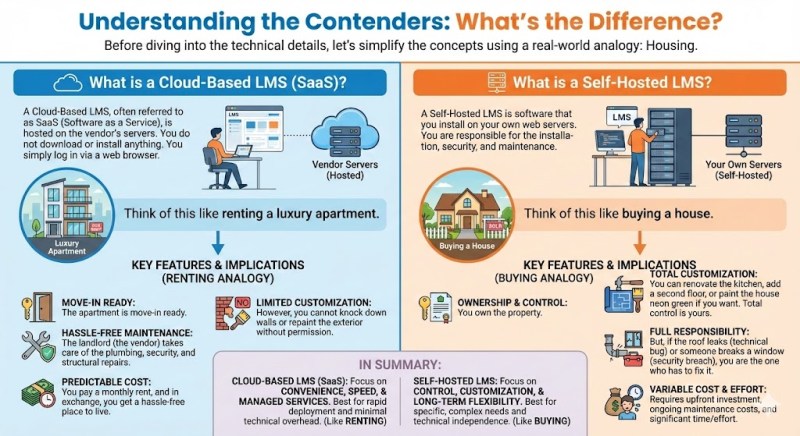
Before diving into the technical details, let’s simplify the concepts using a real-world analogy: Housing.
What is a Cloud-Based LMS (SaaS)?
A Cloud-Based LMS, often referred to as SaaS (Software as a Service), is hosted on the vendor’s servers. You do not download or install anything. You simply log in via a web browser.
Think of this like renting a luxury apartment.
The apartment is move-in ready. The landlord (the vendor) takes care of the plumbing, security, and structural repairs. You pay a monthly rent, and in exchange, you get a hassle-free place to live. However, you cannot knock down walls or repaint the exterior without permission.
uPresenter.ai is an example of cloud-based LMS. You can simply log into your account and upload your elearning content easily.
What is a Self-Hosted LMS?
A Self-Hosted LMS is software that you install on your own web servers. You are responsible for the installation, security, and maintenance.
Think of this like buying a house.
You own the property. You can renovate the kitchen, add a second floor, or paint the house neon green if you want. Total control is yours. But, if the roof leaks (technical bug) or someone breaks a window (security breach), you are the one who has to fix it.
Cloud-Based LMS: The “Plug-and-Play” Solution
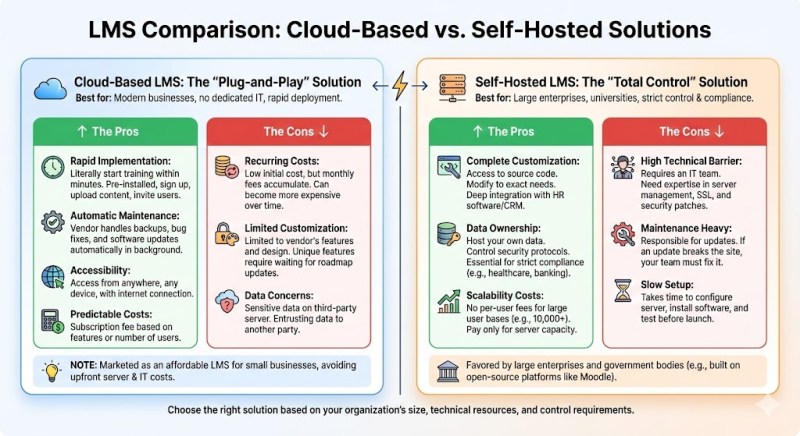
For many modern businesses, especially those without a dedicated IT department, the Cloud is the default choice.
The Pros
- Rapid Implementation: You can literally start training within minutes. Since the software is pre-installed, you just sign up, upload your content from your eLearning authoring tools, and invite users.
- Automatic Maintenance: The vendor handles all the heavy lifting—backups, bug fixes, and software updates happen automatically in the background.
- Accessibility: As long as your learners have an internet connection, they can access the training from anywhere, on any device.
- Predictable Costs: You usually pay a subscription fee based on features or the number of users.
The Cons
- Recurring Costs: While the initial entry cost is low, those monthly subscription fees accumulate. Over 5 or 10 years, renting can become more expensive than owning.
- Limited Customization: You are generally limited to the features and design options the vendor provides. If you need a unique feature, you have to wait and hope they add it to their roadmap.
- Data Concerns: Your sensitive corporate data resides on a third-party server. While reputable vendors have high security, you are still entrusting your data to someone else.
Note: Many Cloud-based options market themselves as an affordable learning management system for small businesses because they avoid the upfront cost of buying servers and hiring IT staff.
Self-Hosted LMS: The “Total Control” Solution
Self-hosted solutions (often built on open-source platforms like Moodle) are favored by large enterprises, universities, and government bodies that require strict control.
The Pros
- Complete Customization: Because you have access to the source code, you can modify the platform to do exactly what you need. You can integrate it deeply with your existing HR software or CRM.
- Data Ownership: You host the data. You control the security protocols. For industries with strict compliance regulations (like healthcare or banking), this is often a non-negotiable requirement.
- Scalability Costs: If you have 10,000 users, a Cloud LMS might charge you per user, costing a fortune. With a self-hosted LMS, you don’t pay per-user fees; you only pay for the server capacity.
The Cons
- High Technical Barrier: You need an IT team. If you don’t know how to manage a server, install SSL certificates, or patch security vulnerabilities, you will struggle.
- Maintenance Heavy: You are responsible for updates. If an update breaks your site, your team has to fix it.
- Slow Setup: It takes time to configure the server, install the software, and test the environment before you can launch.
Comparison Table: Cloud-Based vs. Self-Hosted
To make your decision easier, here is a quick comparison of the two models:
| Feature | Cloud-Based LMS (SaaS) | Self-Hosted LMS |
| Setup Time | Instant (Plug-and-play) | Slow (Requires installation) |
| Upfront Cost | Low | High (Servers + Setup) |
| Long-term Cost | High (Recurring subscriptions) | Lower (No user fees) |
| Maintenance | Vendor managed | You manage (IT required) |
| Customization | Limited to settings | Limitless (Code access) |
| Security | Vendor’s responsibility | Your responsibility |
The Critical Link: eLearning Authoring Tools
Here is the “Elephant in the room” that many LMS providers won’t tell you: An LMS is just a database.
Whether you choose a Cloud-based or a Self-hosted LMS, the platform itself does not teach your employees. It only tracks their progress. The actual teaching is done by the course content—the videos, the interactive quizzes, and the simulations.
This is where your choice of eLearning authoring tools becomes critical.
The Trap of “Built-In” Editors
Many LMS platforms come with simple, built-in content creators. While convenient, they are dangerous. If you build your course inside a specific LMS, that content is often locked there. If you decide to switch from a Cloud LMS to a Self-Hosted one in two years, you might lose all your courses.
The Solution: Standalone Authoring Tools
To maintain flexibility, you should create your content using a professional, standalone eLearning authoring tool. This ensures your content is:
- Portable: You own the source files.
- Standardized: Professional tools export to standards like SCORM or xAPI (Tin Can).
- High Quality: Dedicated tools offer far superior design capabilities than basic LMS editors.
Why ActivePresenter is the Ultimate Partner for Any LMS
When looking for eLearning authoring tools that bridge the gap between high-end features and usability, ActivePresenter stands out as a premier solution.
Whether you decide to rent your LMS (Cloud) or buy it (Self-Hosted), ActivePresenter acts as the perfect “content factory.” Here is why it is the optimal choice for modern instructional designers:
1. The All-in-One Powerhouse
Most tools force you to buy separate software for different tasks. You might need one app for screen recording, another for video editing, and a third for creating quizzes.
ActivePresenter combines all three:
- Smart Capture: Record your screen in crystal clear quality for software simulations.
- Video Editor: Edit audio/video, add green screen effects, zoom-n-pan, and annotations effortlessly.
- eLearning Authoring: Add interactive quizzes, branching scenarios, and games.
2. Universal Compatibility (SCORM & xAPI)
This is the most crucial feature for your LMS strategy. ActivePresenter supports the latest eLearning standards, including SCORM 1.2, SCORM 2004, and xAPI (Tin Can API).
This means you can create a course once in ActivePresenter and it will work perfectly on any LMS. If you start with an affordable learning management system today and upgrade to a massive enterprise Self-Hosted LMS tomorrow, your content moves with you seamlessly. You are never locked in.
3. A Cost-Effective Model (No Subscription Fatigue)
In a world where every piece of software demands a monthly fee (just like Cloud LMSs), ActivePresenter offers a refreshing alternative.
- Free Edition: Unlike “free trials” that expire, ActivePresenter offers a powerful Free edition that allows you to use most features without a water mark (for non-commercial use) or simply to test the waters indefinitely.
- Perpetual License: If you upgrade to the Standard or Pro editions, you pay once and own the license forever. This creates significant savings compared to competitors who charge hundreds of dollars every year.
Final Decision Framework: Which Should You Choose?
Still undecided on the hosting? Use this simple checklist:
- Do you have an IT team?
- No: Go with a Cloud-Based LMS. You cannot afford the security risks of self-hosting without experts.
- Yes: Consider Self-Hosted for long-term savings.
- What is your budget structure?
- Low Upfront / Monthly Budget: Cloud-Based.
- High Upfront / Low Recurring Budget: Self-Hosted.
- How complex is your content?
- Regardless of the LMS, if you need high interactivity, software simulations, or video-based learning, you need powerful eLearning authoring tools.
Conclusion
The debate between Cloud-Based and Self-Hosted LMSs ultimately comes down to a trade-off between convenience and control.
If you want to start fast with minimal technical headaches, choose the Cloud. If you demand total ownership and have the IT muscle to support it, go Self-Hosted.
However, never forget that the LMS is just the delivery mechanism. The success of your training program depends on the quality of the learning experience. By using versatile eLearning authoring tools like ActivePresenter, you ensure that your content is engaging, interactive, and future-proof.
Ready to take control of your eLearning content?
Don’t let your courses get locked into a specific platform. Download ActivePresenter today to start creating professional, LMS-ready videos and interactive courses that work everywhere.
 Elearning Supporter
Leave a comment