Are you tired of juggling a separate screen recorder, video editor, and e-learning authoring tool? In the fast-paced world of digital education and corporate training, content creation needs to be fast, professional, and highly interactive.
Enter ActivePresenter 10 Pro, the latest and most powerful iteration of the all-in-one software from Atomi Systems. For years, ActivePresenter has been the go-to solution for creating everything from simple screencasts to complex, SCORM-compliant e-learning courses.
The new ActivePresenter 10 Pro version takes this a major step further, integrating cutting-edge AI-powered features and a completely streamlined workflow.
This comprehensive review breaks down exactly why ActivePresenter 10 Pro is the essential tool for any serious e-learning professional, focusing on the five core reasons it should be your next investment.
Why ActivePresenter 10 Pro is the Game-Changer
ActivePresenter 10 Pro isn’t just an upgrade; it’s a complete toolkit designed to drastically cut down development time and enhance learner engagement. It brings together the best of video creation and interactive content design, wrapped up in a modernized, intuitive interface.
Here are the 5 major reasons why you need ActivePresenter 10 Pro:
1. AI-Powered E-Learning Toolkit: Drastically Reduce Production Time
The biggest highlight of ActivePresenter 10 Pro is the integration of advanced Artificial Intelligence features. These tools are specifically designed to automate the most time-consuming aspects of e-learning development, giving you hours back in your schedule.
Key AI Features:
- AI Image Generation: Need a custom visual for your course? Generate high-quality images directly within the software from a text prompt. This eliminates the need for expensive stock photo subscriptions or time spent searching for assets.
- Text-to-Speech & Auto Captions: Use the powerful Text-to-Speech (TTS) feature to generate natural-sounding voiceovers in over 20 languages. Furthermore, the Speech-to-Text feature instantly creates accurate closed captions from your audio recordings, dramatically improving accessibility and saving hundreds of hours of manual transcription.
- Project Auto-Translation: Catering to a global audience has never been easier. ActivePresenter 10 Pro can automatically translate the entire text content of your project—including object text, quizzes, and captions—into multiple languages, ensuring seamless localization.
- AI Writing Assistant: For slide content, quiz feedback, or course descriptions, the AI Writing tool helps you refine your text, fix grammar, and adjust the tone, ensuring your educational material is always clear and professional.
The Benefit: The AI toolkit transforms ActivePresenter into a productivity powerhouse. You can move from an idea to a fully voiced, captioned, and localized course faster than ever before.
2. All-in-One: Full-Featured Screen Recorder, Video Editor, and Authoring Tool
Before ActivePresenter, most creators had to use one tool for recording the screen (like Camtasia), another for advanced e-learning authoring (like Articulate Storyline), and maybe a third for complex video edits. ActivePresenter 10 Pro delivers robust functionality for all three—without the need to export and import files between different programs.
Pro-Level Media Capabilities:
- Advanced Screen Recording & Smart Capture: Record your screen as a full-motion video or use the “Smart Capture” mode to automatically generate a slide-based simulation of software interactions (capturing each click/keystroke as a separate slide). This feature alone is a massive time-saver for creating software tutorials.
- Professional Video Editing: The built-in editor on the multi-track timeline is surprisingly robust, offering essential tools like cutting, cropping, speed control, and advanced effects like Audio Ducking (automatically lowering background music when narration is present), Background Removal for images, and Green Screen (Chroma Key) effects for video.
- Seamless Integration: Everything you record is immediately available on the slide canvas and timeline, ready to be edited, annotated, or turned into an interactive element. No more file-format headaches!
The Benefit: ActivePresenter 10 Pro is the only tool you need from concept to final output, simplifying your tech stack and minimizing the learning curve associated with multiple pieces of software.
3. Advanced Interactivity & Quizzing for Maximum Engagement
Static, linear presentations are a thing of the past. Modern learners expect interactive content that tests their knowledge and adapts to their performance. This is where the “Pro” in ActivePresenter 10 Pro truly shines.
Top Interactivity Features:
- 13 Built-in Question Types: Create diverse assessments with question types ranging from Multiple Choice and True/False to advanced options like Fill in the Blank, Drag & Drop, and Essay.
- In-Video Quizzing: A standout feature is the ability to insert questions at specific points within a video on a single slide, creating a seamless, engaging experience without having to break the flow with new slides.
- Object States & Advanced Actions: Build sophisticated interactions using Events and Actions. For example, make a button change color when hovered over, or create a complex branching scenario where a learner’s choice dictates which part of the course they jump to next.
- Variables: Use variables to personalize the learning experience (e.g., displaying the learner’s name) or to create custom scoring systems.
The Benefit: ActivePresenter 10 Pro allows you to move beyond basic quizzes and create truly immersive, personalized, and effective learning experiences that mimic real-world scenarios.
4. Responsive Design & Industry-Standard LMS Output
In 2025, training must be accessible on any device. ActivePresenter 10 Pro ensures your content is future-proof and compatible with virtually any Learning Management System (LMS).
Publishing & Compatibility Highlights:
- Responsive HTML5 Output (FlexBox): Design a single course that automatically adapts and looks great on desktops, tablets, and mobile phones using the flexible layout system.
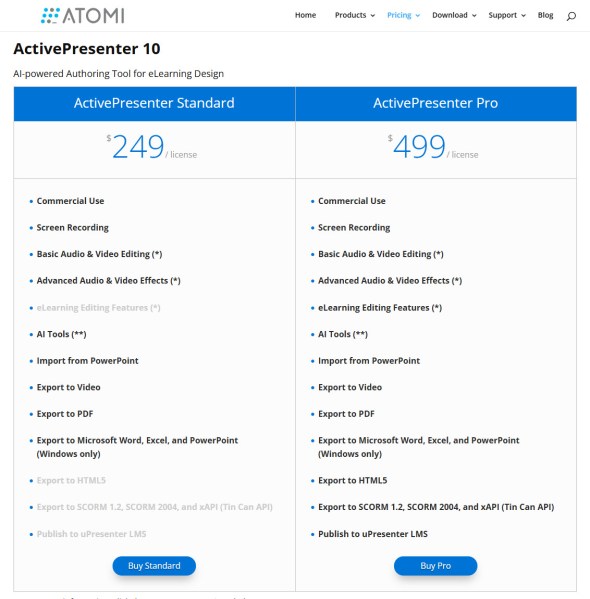
- LMS Compatibility: The Pro edition is mandatory for publishing to industry-standard formats like SCORM 1.2, SCORM 2004, and xAPI (Tin Can API). This ensures you can seamlessly track learner progress, scores, and completions in any major LMS.
- uPresenter Integration (New in V10): For users who don’t have a complex LMS, ActivePresenter 10 Pro offers one-click publishing to uPresenter, a lightweight LMS solution for easy sharing and tracking of learner data.
The Benefit: You can confidently deploy your professional content across any platform or device while maintaining full tracking and reporting capabilities.
5. The Best Value: Power Without the Subscription Trap
While tools like Adobe Captivate or Articulate Storyline offer robust features, they often come with steep annual subscription fees. ActivePresenter 10 Pro stands out with its incredible value proposition.
Financial Advantage:
- Perpetual License: You pay a one-time fee for the license (currently $499 standard price, but watch for promotional launch pricing!) and own the software forever. Say goodbye to crippling yearly recurring costs.
- Unlimited Free Edition: ActivePresenter offers the most generous free edition on the market, allowing you to use all core screen recording and video editing features for personal, non-commercial use (with a watermark). This allows you to fully master the tool before making a financial commitment.
- Affordable Upgrades: Even when a new major version is released, upgrading is typically a fraction of the cost, making it the most cost-effective long-term solution for professional e-learning authoring.
The Benefit: ActivePresenter 10 Pro delivers enterprise-grade features, including advanced e-learning, video editing, and the new AI toolkit, all at a fraction of the total cost of ownership compared to subscription-based competitors.
ActivePresenter 10 Pro vs. The Competition
If you are currently using a simpler tool like Camtasia, you’ll find ActivePresenter 10 Pro to be a true upgrade. While Camtasia is a fantastic screen recorder and simple video editor, it lacks the advanced quizzing, complex interactions, SCORM/xAPI publishing, and responsive design features that make ActivePresenter a true e-learning authoring tool.
For corporate trainers and educators, the combination of robust video editing, AI automation, and full LMS compliance in a single, perpetual license is simply unmatched in the industry.
Final Verdict: Is ActivePresenter 10 Pro Worth the Investment?
Absolutely.
If your goal is to create professional, interactive, and SCORM-compliant e-learning courses or advanced software simulations, ActivePresenter 10 Pro is the single best-value investment you can make in your toolkit today. The addition of the AI-Powered Toolkit in version 10 is a game-changer, fundamentally streamlining your production process.
Stop wasting time with multiple tools and start creating better content, faster.
👉 Download the free version of ActivePresenter 10 Pro today and see the difference for yourself before upgrading to the Pro license for unlimited power and commercial use.
 Elearning Supporter
Leave a comment