If you’ve ever built a training video by bouncing between a screen recorder, a separate video editor, a quiz-authoring tool, and finally an LMS uploader, you already know the real cost isn’t the software price. It’s the hours lost stitching four disconnected workflows into one deliverable, and the panic when a stakeholder asks for “one small change” that now means reopening three different project files.
That pain point hasn’t gone away in 2026, but the tools available to solve it have gotten dramatically smarter. AI is no longer just a caption generator bolted onto old software. The newest wave of platforms can generate voiceovers, write scripts, translate entire courses, and in a few cases, let an AI agent directly interact with your project files to build or edit content for you.
In this guide, we’ll break down the six best video training software options with AI Agent capabilities in 2026, compare them side by side, walk through three real production scenarios, and share a few pro tips I’ve picked up after a decade of building training content for banks, IT teams, and universities.
What Makes “AI Agent” Video Training Software Different in 2026
Most “AI-powered” training tools in the past few years simply meant: click a button, get a synthetic voice, or auto-generate subtitles. Useful, but passive.
An AI Agent integration is different. It means an AI model — think Claude, ChatGPT, or a custom LLM — can connect directly to your authoring project through a protocol (like MCP, Model Context Protocol) and actually take action: generate a quiz from your script, restructure a slide sequence, or batch-edit narration across dozens of lessons, without you manually prompting each step in a chat window and copy-pasting the result back in.
For trainers managing large course libraries, that distinction is the difference between “AI helped me write a paragraph” and “AI helped me finish an entire module.”
How I Evaluated These 6 Tools
I judged every tool against five criteria that actually matter for training content, not marketing checklists:
- Recording quality — screen, webcam, and audio capture fidelity
- Non-destructive editing — can you tweak without re-recording?
- Interactivity & compliance export — quizzes, branching, SCORM/xAPI support
- AI depth — voiceover, image generation, translation, and true agent connectivity
- Total cost of ownership — licensing model, not just sticker price
The 6 Best Video Training Software with AI Agent Capabilities
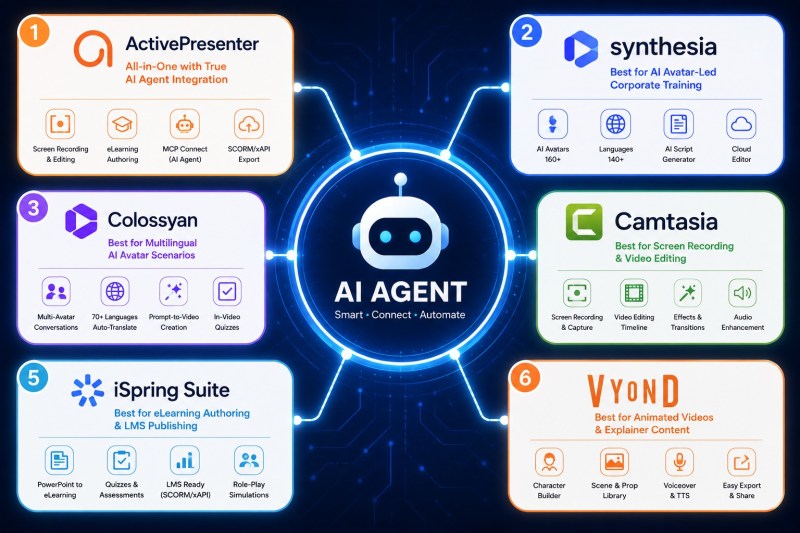
1. ActivePresenter 10 — Best All-in-One Tool with True AI Agent Integration
In over ten years of producing training content, I’ve rarely found a tool that keeps recording, editing, and interactive authoring under one roof and adds genuine AI agent connectivity on top. ActivePresenter 10 is currently the clearest example of this in the market.
Core strengths:
- High-quality screen recording with smart capture that detects clicks automatically — ideal for software simulations
- Non-destructive video editing on a full timeline, so trimming, layering, and re-arranging never damages your source footage
- Advanced eLearning authoring — quizzes, branching scenarios, drag-and-drop interactions
- SCORM/xAPI export for direct LMS deployment, with tracking that actually works out of the box
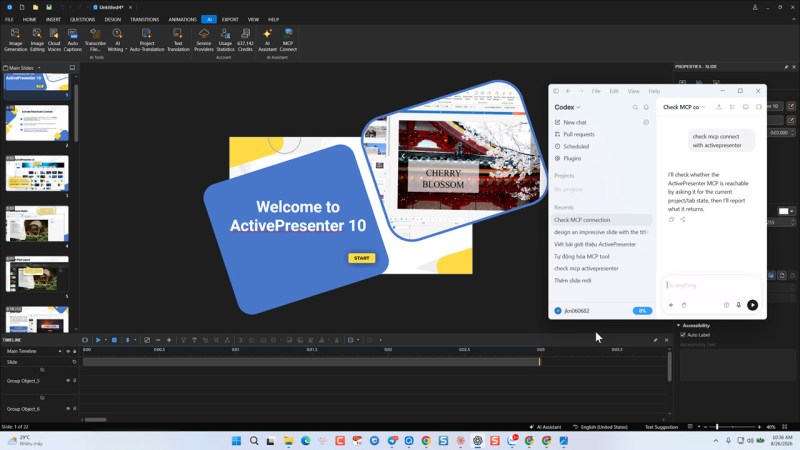
- MCP Connect — the AI Agent feature that lets external AI models interact with your project to auto-generate content, restructure slides, or batch-edit at scale
- Cloud Voices, AI Writing Assistant, AI Image Generation, Auto Captions, and Project Auto-Translation rounding out a genuinely complete AI toolkit
- Responsive, professional course output that adapts to desktop, tablet, and mobile learners
- Licensing — a lifetime license option (not just subscription-only), plus a free version with no watermark and no artificial time limits
Best for: Trainers and instructional designers who want recording, editing, interactivity, and AI agent workflows in a single application — without paying enterprise SaaS pricing.
2. Synthesia — Best for AI Avatar-Led Corporate Training
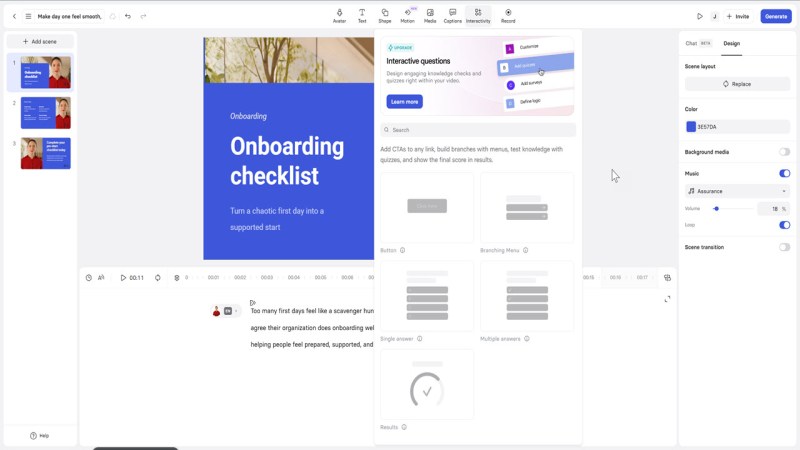
Synthesia turns a script into a fully voiced, AI-avatar-led video without filming anything. It is particularly effective for standardized corporate messaging—such as HR onboarding, compliance briefings, and global policy updates—where a human presenter isn’t available or required.
Core strengths:
- 160+ Realistic AI Avatars: Wide range of diverse avatars with natural gestures, micro-expressions, and customizable attire.
- 140+ Languages & Voices: Instant voice synthesis and lip-syncing in over 140 languages with localized accents.
- AI Video Assistant: Converts existing documents, PDFs, or web links into draft video scripts and structured scenes automatically.
- Intuitive Cloud Editor: Simple canvas interface designed for quick slide layout adjustments, video asset insertion, and text edits without video editing expertise.
AI Capabilities: AI script generator, document-to-video auto-generation, synthetic voice synthesis, and automated multilingual video localization.
Licensing: Subscription-based model (Starter, Creator, and Enterprise tiers available on monthly or annual plans; no lifetime license option).
Best for: L&D teams, HR departments, and corporate trainers who need to scale video-first compliance and training content rapidly without studio equipment or onscreen talent.
Watch-out: Limited screen recording capabilities and no native SCORM/xAPI interactivity authoring — you’ll likely still need a dedicated authoring tool to package content for an LMS.
3. Colossyan — Best for Multilingual AI Avatar Scenarios
Colossyan leans heavily into scenario-based training and conversational role-play. It excels at creating multi-avatar interactions that are ideal for soft-skills development, customer service scenarios, and internal sales training across global teams.
Core strengths:
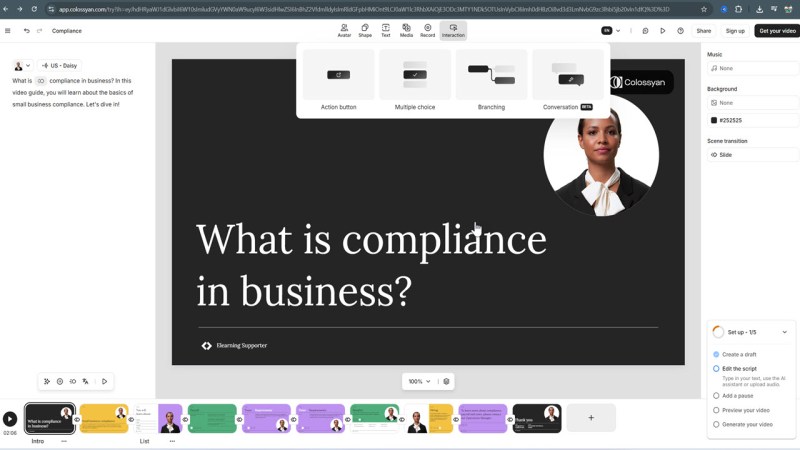
- Multi-Avatar Conversations: Ability to place multiple AI avatars on screen simultaneously to simulate realistic workplace dialogues.
- Automated Localization: Translates entire video projects into 70+ languages with automatic voiceover and subtitle synchronization in a single click.
- Prompt-to-Video Creation: Transforms rough outline notes or training docs into structured video drafts using integrated AI templates.
- In-Video Knowledge Checks: Built-in interactive quizzes and survey overlays to maintain learner engagement during playback.
AI Capabilities: AI scenario builder, multi-avatar conversational scripting, text-to-video generation, and one-click AI translation.
Licensing: Subscription-based tiers (Starter, Pro, and Enterprise, structured primarily around video generation minutes per month).
Best for: Customer success leads, sales enablement managers, and HR specialists who require scenario-based soft-skills training with rapid international rollout.
Watch-out: Like Synthesia, it’s avatar-first, not screen-recording-first, making it a poor fit for detailed software walkthroughs, complex IT training, or application simulations.
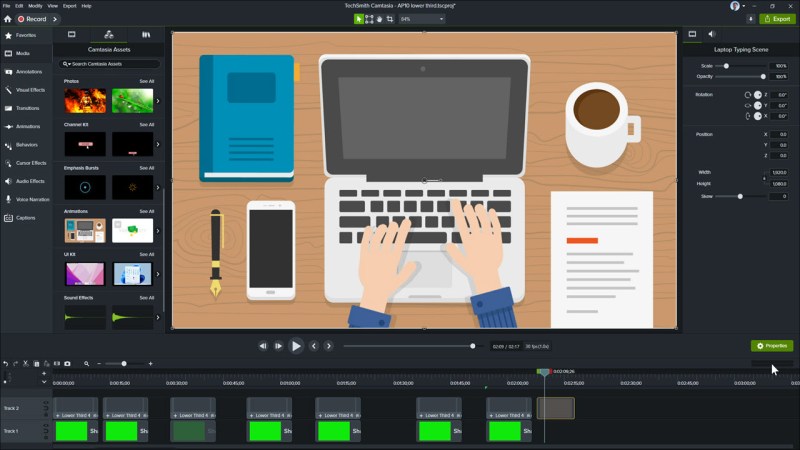
4. Camtasia — Best for Polished Standalone Tutorials with Light AI
Camtasia remains an industry standard for cinematic, standalone screen-recorded tutorials. While its AI feature set focuses primarily on audio and editing workflows rather than synthetic avatars, its post-production polish and recording fidelity are top-tier.
Core strengths:
- High-Precision Screen Capture: High-FPS recording of screen, camera, and system audio with automated cursor tracking and path smoothing.
- Camtasia Rev Engine: Dynamic workflow layout tool that automatically formats raw captures with professional backgrounds, aspect ratios, and visual frames.
- Rich Asset Library: Extensive collection of customizable lower thirds, transitions, callouts, audio effects, and intro/outro templates.
- Audiate Integration: Seamless pairing with Audiate for text-based audio editing—edit your video script like a text document to automatically trim video frames.
AI Capabilities: AI speech-to-text transcription, AI noise removal, text-based audio/video editing, and automated caption generation.
Licensing: Subscription based license with annual maintenance plans, alongside recurring subscription options.
Best for: Video creators, technical writers, and educators who prioritize high visual polish, smooth screen capture, and precise timeline editing over complex LMS interactivity.
Watch-out: Interactivity (limited to basic quizzes/hotspots) and LMS tracking export are minimal compared to purpose-built eLearning authoring suites.
5. iSpring Suite — Best for PowerPoint-Centric Trainers
If your organization already builds its training materials in Microsoft PowerPoint, iSpring Suite layers in interactive eLearning tools and AI course assistance directly into PPT without requiring your team to master a brand-new standalone application.
Core strengths:
- Native PowerPoint Integration: Operates directly as a ribbon tab inside Microsoft PowerPoint, preserving animations, transitions, and slide layouts seamlessly.
- Comprehensive Quiz Builder: 14 question types (including drag-and-drop, hotspot, and sequence) with rich feedback rules.
- E-Learning Standard Compliance: Flawless export to SCORM (1.2 & 2004), xAPI, cmi5, and AICC for instant LMS deployment.
- Interactive Content Modules: Built-in interactive catalog templates, timeline layouts, and dialogue simulations for soft-skills practice.
AI Capabilities: iSpring AI assistant built into the PowerPoint ribbon for generating quiz questions, structuring course outlines, and polishing slide text tone.
Licensing: Annual subscription per author license (iSpring Suite Max package includes cloud collaboration and AI feature credits).
Best for: Instructional designers and corporate educators who manage large libraries of legacy PowerPoint decks and want to convert them into interactive SCORM courses quickly.
Watch-out: You are inherently bound to PowerPoint’s layout and rendering mechanics, which can feel restrictive for advanced responsive design or complex software simulations.

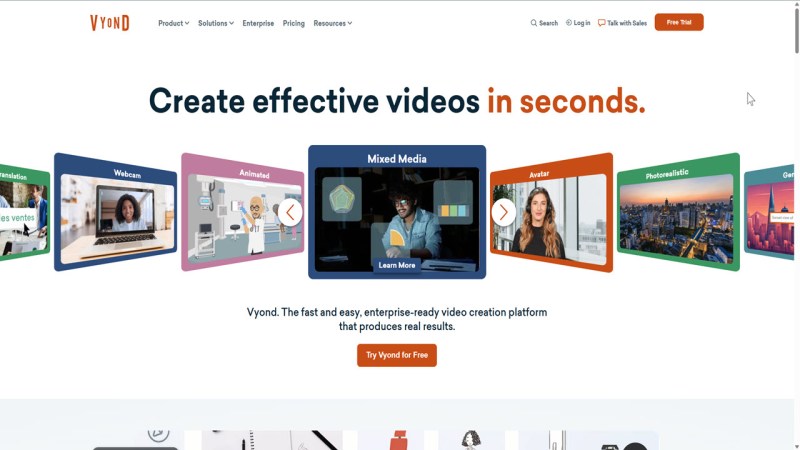
6. Vyond — Best for Animated Soft-Skills Scenarios
Vyond specializes in animated character-driven video production, making it the ideal tool for HR and soft-skills training where live-action footage or screen recording feels out of place. Its AI engine (Vyond Go) drastically speeds up the traditional animation timeline.
Core strengths:
- Vast Character & Scene Library: Thousands of customizable animated characters, props, actions, and environments spanning multiple visual styles (Business Friendly, Contemporary, Whiteboard).
- Vyond Go Prompt-to-Video: Generates complete animated script drafts and fully staged video scenes in seconds from a simple text prompt.
- Automatic Lip-Sync & Text-to-Speech: Natural voice synthesis with automatic lip-matching for imported audio files or generated scripts.
- Brand Customization: Global color swap tools, logo insertion, and custom photo-to-character asset generation.
AI Capabilities: Vyond Go prompt-to-animation generator, AI photo-to-character transformation, text-to-speech synthesis, and instant voice translation.
Licensing: Tiered annual subscriptions (Essential, Premium, Professional, and Enterprise plans).
Best for: HR managers, compliance officers, and instructional designers seeking to turn sensitive, complex, or dry behavioral subjects into engaging animated stories.
Watch-out: Not designed for high-resolution screen recordings, interactive software simulations, or granular SCORM variable tracking.
Head-to-Head Comparison Table
| Tool | Screen Recording | Non-Destructive Editing | SCORM/xAPI | AI Agent (MCP-style) | Best For |
| ActivePresenter 10 | ✅ | ✅ | ✅ | ✅ (MCP Connect) | All-in-one training production |
| Synthesia | ❌ | Limited | ❌ | ❌ | Avatar-led corporate messaging |
| Colossyan | ❌ | Limited | ❌ | ❌ | Multilingual role-play scenarios |
| Camtasia | ✅ | ✅ | Limited | ❌ | Standalone tutorial polish |
| iSpring Suite | Limited | Limited | ✅ | ❌ | PowerPoint-based courses |
| Vyond | ❌ | ✅ (animation) | ❌ | ❌ | Animated soft-skills training |
How to choose the best video training software in 2026?
Choosing the right tool comes down to your production workflow, how you handle software simulations, and your long-term ROI requirements.
Here is how to evaluate the current market to find the best fit for your production pipeline.
1. Define Your Production Workflow
The first step is determining how much manual control you need versus how much you want to automate.
- Dedicated Screen Capture & Timeline Editing: If your workflow involves assembling external assets—like drafting scripts with AI, generating voiceovers separately, and layering complex visuals—you need a robust timeline editor. Tools like ActivePresenter or TechSmith’s Camtasia are ideal when you need precise frame-by-frame control, custom transitions, and the ability to cut dead air seamlessly.
- Heavy-Duty Authoring & Simulation: For comprehensive eLearning modules, standalone video isn’t enough. You need SCORM-compliant authoring tools like ActivePresenter or iSpring Suite. If your training requires interactive annotations where the user must click through a process, look specifically for true simulation capabilities. For instance, using the Record Software Simulation feature in ActivePresenter captures interactive data directly, which is vastly superior to manually adding standard video overlays or basic annotation shapes later.
- AI Avatar & Text-to-Video Generators: If you are building concept-heavy explainers, policy updates, or onboarding videos, platforms like Synthesia, Colossyan, are dominating 2026. These allow you to paste a script and output a polished video with an AI presenter and voiceover in minutes, bypassing the need for a camera entirely.
- Automated Workflow Capture: For standard operating procedures (SOPs), tools like Guidde or TapVid automatically track your mouse clicks and keystrokes, instantly generating a step-by-step video and text guide without manual timeline editing.
2. Evaluate the Licensing Model (ROI)
The shift toward subscription-based software (SaaS) has made long-term cost a major deciding factor.
Evaluate how the pricing structure impacts your bottom line over a 3-to-5-year period. Subscription models (like Articulate 360) provide constant cloud updates and asset libraries, but the recurring annual cost can be steep. Conversely, perpetual licenses (often offered by tools like ActivePresenter, or older TechSmith models) require a larger upfront investment but drastically improve your ROI if you don’t strictly need cloud collaboration features or constant generative AI credits.
If a tool does charge for AI credits, check if those credits are pooled. A major advantage in some desktop software is the ability to share a single pool of AI credits across multiple computers activated under the same license key.
3. Match the Tool to the Delivery Method
Where your learners watch dictates what you buy.
- Learning Management Systems (LMS): If your content must track completion, pass/fail rates, or learner interactions, you require tools that export to SCORM, xAPI, or cmi5. Pure video editors cannot do this natively.
- Public Platforms (YouTube) & Web: If you are building a channel or an affiliate site, standard high-definition MP4 output is all you need. Focus your budget on editing speed, visual effects, and audio sweetening rather than LMS packaging.
FAQs about video training software
Is there a free video training software with AI Agent features?
Yes — ActivePresenter offers a free version with no watermark and no time limit for its core recording and editing features, though some AI functions (like Cloud Voices) use a credit-based system.
What is MCP Connect?
It’s ActivePresenter’s AI Agent integration, allowing external AI models to interact directly with your training project to generate or edit content programmatically.
Do I need SCORM/xAPI if I’m not using a formal LMS?
Not necessarily — but if you ever plan to track completion, scores, or time-on-task, exporting in SCORM/xAPI from the start saves you from re-authoring later.
Final Verdict — Where to Start
If your training needs stop at “record a video and translate it once,” an avatar tool like Synthesia or Colossyan might be enough. But if you’re building recurring, trackable, interactive training content — software simulations, compliance modules, multilingual onboarding — you’ll save yourself the exact 30-hour nightmare I described earlier by choosing a platform where recording, editing, interactivity, and AI agent workflows already live together.


Leave a Reply