In today’s fast-paced digital world, the pressure to create compelling and visually engaging presentations quickly is immense. Whether you’re a marketer pitching a new campaign, an educator developing course materials, or a student preparing for a crucial project, the time and effort required to design slides from scratch can be a significant hurdle. But what if you could harness the power of artificial intelligence to do the heavy lifting? The rise of AI in content creation has been a game-changer, and AI presentation makers are at forefront of this revolution.
One prominent name in this evolving landscape is Gamma App. It promises to transform how we create presentations, documents, and even simple web pages using the power of AI. But with new tools emerging constantly, the big question for 2025 is: Is Gamma App truly the best AI presentation maker available right now?
This in-depth review will meticulously explore Gamma App’s capabilities. We’ll dive into its core functionalities, dissect its key features, weigh its pros and cons, and examine its pricing structure. Furthermore, we’ll introduce a noteworthy alternative, uPresenter, for those with specific interactive or educational needs. By the end of this article, you’ll have a clear understanding of what Gamma App offers and whether it’s the right fit for your presentation goals in 2025.
What is Gamma App?
At its heart, Gamma App is an AI-powered platform designed to streamline and accelerate the creation of engaging content. Think of it as an intelligent assistant that takes your raw ideas, text prompts, or existing documents and helps you generate polished presentations, informative documents, or even basic, shareable webpages—often in a matter of minutes.
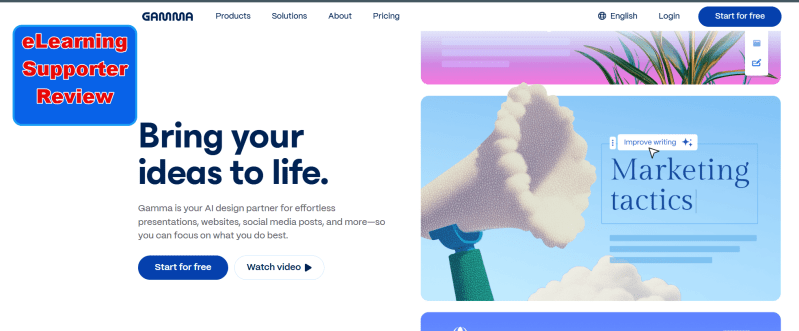
So, how does it work its magic? Gamma App leverages a suite of advanced artificial intelligence models. While the specific blend is proprietary, it’s known to utilize powerful large language models (LLMs) like those from the GPT family (OpenAI), Claude (Anthropic), and potentially others, alongside image generation models such as DALL-E and more. When you provide Gamma with a topic or a starting point, its AI gets to work. It can suggest relevant outlines, generate draft text for your slides (or “cards,” as Gamma calls its flexible content blocks), propose suitable design themes, and automatically arrange layouts. This significantly reduces the manual effort traditionally associated with presentation design.
Gamma App is built for creating different output type such as PPT presentations, webpage, document or social post. It can also help you generate a website using AI too. Of course, you can design anything from scractch with its design tools.
Gamma App: Key Features Explored
To truly understand Gamma App’s potential, let’s break down its core features as of 2025:
1. AI-Powered Content Generation: This is Gamma’s cornerstone.
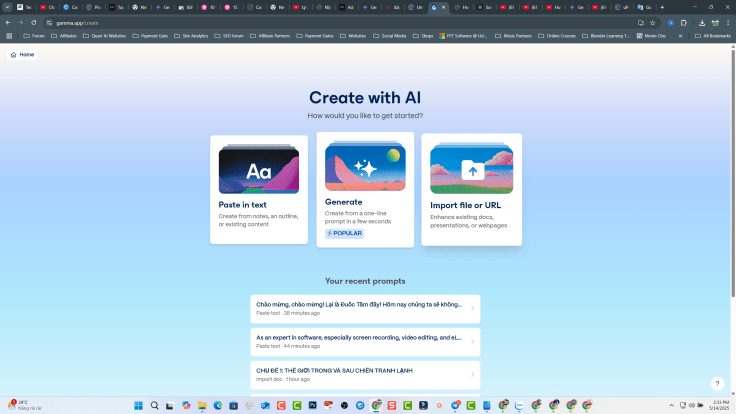
- Generate from a Prompt: You can start with a simple text prompt, like “Create a presentation on the benefits of remote work,” and Gamma’s AI will generate an outline and initial content for your cards. This is incredibly useful for brainstorming or when you’re short on time.
- AI Writing Assistance: Beyond initial generation, Gamma’s AI can help you rewrite, summarize, or expand upon existing text within your cards. If you’re stuck on wording or need to adjust the tone, the AI acts as a co-writer.
- Import Existing Content: Have a Word document, notes, or an old presentation? Gamma allows you to import various file types or paste text, and its AI will help you reformat and restructure that content into a new Gamma presentation. This is great for repurposing existing materials.
2. Design and Customization:
- Templates and Themes: It offers a selection of pre-designed templates and themes to give your presentations a professional look from the get-go. These provide a starting point that you can then tailor.
- AI-Assisted Design: The AI doesn’t just write content; it also suggests layouts, color palettes, and font pairings based on your chosen theme and content. This helps maintain visual consistency and appeal.
- Customization Options: While Gamma excels at automated design, it also provides tools to customize elements. You can change colors, fonts, layouts for individual cards, and tweak styles. However, it’s worth noting that some users find the level of granular control less extensive than what traditional software like PowerPoint offers. The focus is more on guided customization than pixel-perfect control.
3. Multimedia and Interactive Elements: Static presentations are a thing of the past. Gamma allows you to easily enrich your content.
- Easy Embedding: You can seamlessly embed images, videos (e.g., from YouTube or Vimeo), GIFs, and even other web content like interactive charts or maps directly into your cards.
- Interactive Elements: Gamma supports adding elements like buttons. While not as advanced as dedicated eLearning authoring tools, these can add a layer of engagement. The platform has been evolving, so the range of interactive elements available in 2025 should be checked on their official site.
4. Collaboration Features:
- Real-Time Collaboration: On its paid plans, Gamma typically offers real-time collaboration, allowing multiple users to work on the same presentation simultaneously, much like Google Slides. Edits and comments can be seen by all collaborators instantly.
- Commenting and Feedback: Team members can leave comments and provide feedback directly on specific cards, streamlining the review and revision process.
5. Analytics and Tracking: Once you share your Gamma, you might want to know how it’s being received.
- Built-in Analytics: Gamma often includes analytics features (especially in its Pro plans) that allow you to track engagement. This can include metrics like the number of views, how much time viewers spend on certain cards, and potentially interaction data. This is valuable for understanding audience interest and refining future presentations.
6. Export and Sharing Options: Getting your presentation to your audience is crucial.
- PDF and PPTX Export: You can export your Gamma presentations to standard formats like PDF for easy sharing or archiving, and PPTX if you need to open or edit them in Microsoft PowerPoint (though some AI-specific formatting might not translate perfectly).
- Share via Link: The most common way to share a Gamma is via a direct web link. This ensures viewers see the presentation as intended, with all its interactive elements and responsive design intact.
7. Ease of Use & Interface: Gamma is generally praised for its user-friendly interface.
- Intuitive for Beginners: The platform is designed to be easy to navigate, even for those who aren’t design-savvy. The AI handles much of the complexity, making the creation process feel straightforward.
- Learning Curve for Advanced Features: While basic creation is simple, unlocking the full potential of all customization options and advanced AI commands might involve a slight learning curve. However, it’s generally less steep than traditional comprehensive design software.
8. AI Image Generation: Visuals are key to engaging presentations.
- Text-to-Image: Gamma includes tools that allow you to generate unique images directly within the platform using text prompts, leveraging models like DALL-E or Stable Diffusion. This means you can create custom visuals that perfectly match your content without needing to search stock photo sites.
Gamma App: Pros and Cons (2025)
No tool is perfect, and Gamma App is no exception. Here’s a balanced look at its advantages and disadvantages as of 2025:
Pros:
- Speed and Efficiency: This is Gamma’s standout benefit. The ability to go from a simple prompt to a fully fleshed-out presentation draft in minutes is a massive time-saver.
- Ease of Use: You don’t need to be a graphic designer to create professional-looking presentations. The AI handles much of the design work, making it accessible to users of all skill levels.
- Helpful AI-Powered Assistance: The AI is a genuine partner in the creation process, assisting with idea generation, outlining, writing initial drafts, and even suggesting design improvements.
- Visually Appealing Outputs: Gamma can produce modern, clean, and aesthetically pleasing presentations that often look more dynamic than traditional slides.
- Effective Real-Time Collaboration (Paid Plans): For teams, the ability to co-create and comment in real-time significantly streamlines workflows.
- Useful Built-in Analytics (Paid Plans): Understanding how your audience interacts with your presentations provides valuable insights for refinement.
- Integrated AI Image Generation: Creating custom visuals on the fly without leaving the platform is a powerful feature.
Cons:
- Customization Limitations: While easy to use, Gamma may not offer the deep, granular customization that power users or professional designers accustomed to tools like PowerPoint or Keynote might expect. Fine-tuning every little detail can sometimes be challenging.
- AI Content Can Be Imperfect: AI-generated text is a fantastic starting point, but it almost always requires human review, editing, and fact-checking to ensure accuracy, appropriate tone, and originality. Over-reliance on raw AI output can lead to generic or even incorrect content.
- Template Variety Could Be Wider: While a good range of templates is available, some users might find the selection somewhat limited over extended use or for very niche topics.
- Credit System on Free/Lower Tiers: The free plan typically operates on a one-time credit allocation (e.g., 400 credits at signup). These credits don’t usually renew, meaning continuous free use is limited. Specific AI actions (like generating a full deck or an image) consume credits, pushing users towards paid subscriptions for ongoing use.
- No Offline Editing: Gamma is a web-based tool, so you generally need an active internet connection to create and edit presentations. There isn’t typically an offline editing mode.
- Data Privacy Considerations: As with any cloud-based AI tool, users should be mindful of the data they input into the platform, especially if it’s sensitive or confidential. It’s always wise to review the platform’s privacy policy.
- Potential for Occasional Lag: Some users have reported occasional sluggishness or lag, particularly when working on very large or complex presentations with many multimedia elements.
Gamma App Pricing Details (2025)
Understanding the investment is key. As of early 2025, Gamma App’s pricing structure typically includes a few tiers:
- Free Plan:
- Cost: $0
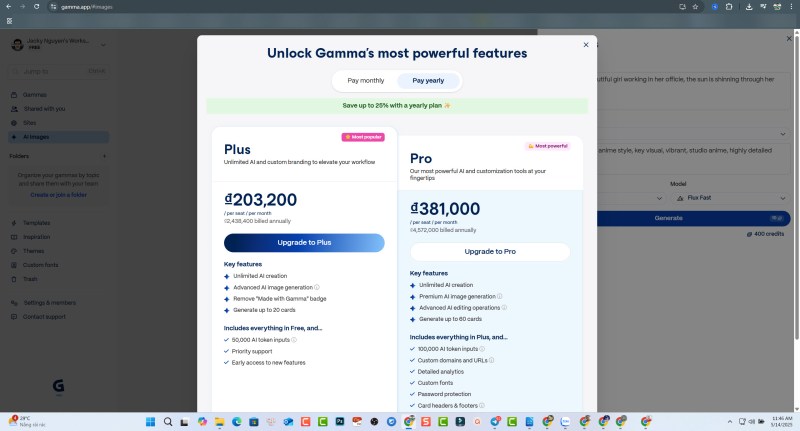
- Features: This plan is designed to give you a taste of Gamma. It usually comes with a one-time allotment of AI credits (e.g., 400 credits upon signup). These credits are consumed when you use AI features – for instance, generating a full presentation might cost around 40 credits, while generating an AI image might cost 10 credits.
- Limitations: The free credits don’t typically renew. Presentations might carry a “Made with Gamma” badge. There might be limits on the number of “cards” per deck or access to premium AI models and advanced features like detailed analytics or collaboration.
- Plus Plan (or similar entry-level paid tier):
- Cost: Around $8 – $10 per user per month (often with a discount for annual billing).
- Features: This tier usually unlocks unlimited AI creation (or a significantly higher monthly credit allowance). The “Made with Gamma” badge is typically removed. You might get access to more templates, more “cards” per deck, and basic export options.
- Pro Plan (or similar higher-level paid tier):
- Cost: Around $15 – $20 per user per month (again, with annual discounts).
- Features: The Pro plan generally includes everything in the Plus plan, plus advanced features like custom domain names for your shared Gammas, more sophisticated AI image generation capabilities, detailed engagement analytics, priority support, and potentially early access to new features. Collaboration features are often fully unlocked here.
Understanding the Credit System: The credit system, especially on the free plan, is crucial to understand. Each AI-driven action (generating a deck, adding an AI-suggested card, generating an image, using the AI chat for suggestions) consumes a certain number of credits. This means free users need to be strategic about how they use their initial credit allowance.
Value for Money: Is Gamma App good value? For users who frequently create presentations and can leverage the speed and AI assistance, the paid plans can offer significant time savings, which often translates to good value. The Free plan is excellent for trying out the platform, but for regular use, a subscription is almost certainly necessary. Compared to other AI presentation tools, its pricing is generally competitive, especially considering the breadth of its AI capabilities.
The Verdict: Is Gamma App the Best AI Presentation Maker in 2025?
After a thorough examination of its features, strengths, and weaknesses, it’s clear that Gamma App is a good and highly capable AI presentation maker in 2025. It excels in delivering speed, ease of use, and visually appealing results, particularly for users who want to generate presentations quickly without getting bogged down in complex design details. The AI-driven content generation and design assistance are genuinely helpful and can significantly boost productivity.
Its key strengths – rapid creation from prompts, an intuitive interface, responsive design, and useful collaboration features – make it a compelling choice for a wide range of users, from marketers and educators to students and business professionals.
However, it’s not without its limitations. Users seeking the utmost control over every minute design element might find it less flexible than traditional software. The AI-generated content, while a great starting point, always needs a human touch for refinement and accuracy. Furthermore, the credit-based system on the free plan means that for sustained use, a paid subscription is effectively required.
So, is Gamma App the absolute best AI presentation maker in 2025? The answer is nuanced. For many users, particularly those who prioritize speed, AI assistance, and modern aesthetics, Gamma App will indeed feel like the best option. It’s undoubtedly a leading tool in the AI presentation space and a strong contender for the top spot.
However, the “best” tool is always subjective and depends heavily on individual needs and priorities. If your primary focus is on highly detailed, pixel-perfect design control, or if you require deep integration with specific enterprise systems not offered by Gamma, then other specialized tools might be a better fit.
BEST GAMMA APP ALTERNATIVE: uPresenter AI
While Gamma App offers a robust solution for general AI presentation creation, it’s always wise to consider alternatives, especially if you have specific needs. One such alternative that warrants attention, particularly for those in education or training, is uPresenter.
An Alternative to Consider: uPresenter
uPresenter is an AI-powered platform designed not just for presentations, but with a keen focus on creating interactive content, making it particularly interesting for educators, corporate trainers, and anyone looking to build more engaging learning experiences. Interestingly, uPresenter is developed by Atomi Systems, the company also behind the well-regarded eLearning authoring tool, ActivePresenter. This lineage suggests a strong foundation in creating tools for educational content.
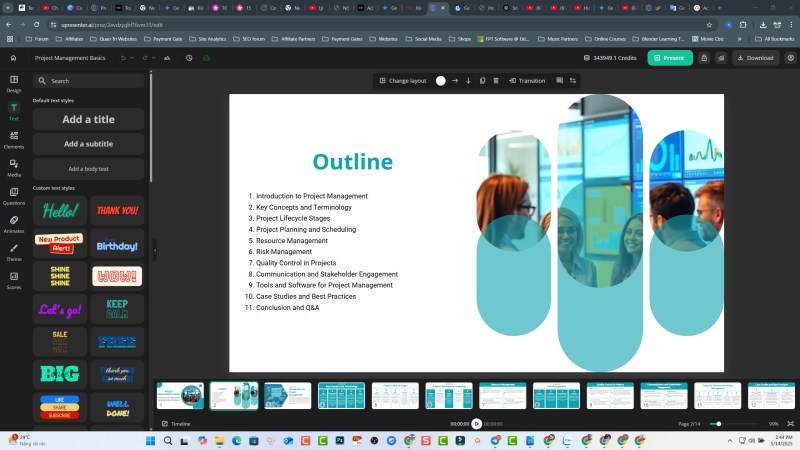
uPresenter – Key Differentiating Features:
What sets uPresenter apart, especially when viewed as an alternative to a more general tool like Gamma?
- Emphasis on Interactive Elements: uPresenter often highlights its capabilities for creating interactive quizzes, polls, and other engaging elements directly within presentations. This is a step beyond basic multimedia embedding and moves towards active learner participation.
- AI for Learning Content: The AI in uPresenter is geared towards generating not just presentation slides, but also supporting learning materials like quizzes. You can input your topic, objectives, and target audience, and the AI assists in structuring lessons and assessments.
- Learner Tracking and Analytics: A significant differentiator is its features for tracking learner responses, progress, and engagement with the interactive elements. This provides valuable data for educators and trainers to understand learning effectiveness. This is often more detailed than general presentation view analytics.
- Collaboration for Educational Development: Like Gamma, it offers collaboration tools, but these can be particularly useful in an educational context where multiple instructors or subject matter experts might be co-developing course materials.
- Templates and Auto-Formatting: Similar to Gamma, uPresenter provides themes and AI-assisted formatting to ensure professional-looking output quickly.
uPresenter – Potential Pros (as an alternative to Gamma):
- Stronger Focus on Interactivity: If your primary goal is to create presentations that actively engage the audience with quizzes, feedback loops, and interactive tasks, uPresenter is likely to have more specialized features in this area than Gamma.
- Tailored for Education and Training: Its feature set, including learner analytics and AI assistance for quiz creation, makes it a more targeted solution for educational or corporate training scenarios.
- Potential LMS Integration: Given its educational focus, uPresenter might offer better integration capabilities with Learning Management Systems (LMS), though this would need to be verified for the latest version.
uPresenter – Potential Cons or Areas Where it Differs from Gamma:
- Different Primary Focus: While it can create presentations, its core strength and development priority may lean more towards interactive eLearning modules rather than purely informational business presentations. This might mean its general presentation template variety or features for purely business-centric decks are less extensive than Gamma’s.
- User Interface and Workflow: The UI and overall workflow might be optimized for creating structured learning content, which could feel different or potentially more complex than Gamma’s straightforward presentation-first approach if you’re just looking for quick slide generation. Some earlier reviews (though these might be outdated for 2025) mentioned its UI and export options as areas for improvement.
- AI Information Accuracy: As with all AI tools, the information generated or suggested by uPresenter’s AI, especially for specialized educational topics, would require careful vetting by subject matter experts.
Who Might Prefer uPresenter?
uPresenter is likely to be a more appealing option for:
- Educators (K-12, Higher Education): Teachers and professors looking to create interactive lessons, presentations with embedded quizzes, and track student understanding.
- Corporate Trainers and HR Professionals: For developing engaging training modules, onboarding materials, and compliance courses with assessment components.
- Instructional Designers: Professionals who specialize in creating effective learning experiences and require tools with robust interactivity and tracking.
- Anyone whose primary output needs to be more of an interactive learning experience than a traditional, more passive presentation.
If your needs align with these scenarios, uPresenter is definitely worth exploring as a compelling alternative or even a complementary tool to Gamma App.
NO NEED AI TOOL? Check out This Comprehensive Tool: Atomi ActivePresenter?
While AI presentation makers like Gamma App and specialized interactive platforms like uPresenter are fantastic for rapidly generating slides and specific types of engaging content, your needs might sometimes extend beyond what these tools are primarily designed for. If you find yourself requiring more in-depth capabilities for screen recording, advanced video editing, or full-fledged eLearning course development, then a more comprehensive, all-in-one solution like Atomi ActivePresenter becomes highly relevant.
Atomi ActivePresenter is a powerful and versatile software, available as a robust free version with paid options for even more advanced features. It excels in several key areas that often complement or go beyond typical AI presentation tools:
- Professional Screen Recording: ActivePresenter is renowned for its high-quality screen recording capabilities. You can capture anything on your screen, including software simulations with automatic annotations, webcam footage, and system audio, making it perfect for creating software tutorials, product demonstrations, and instructional videos.
- Advanced Video Editing Suite: Beyond simple trimming or adding background music (which some presentation tools might offer), ActivePresenter provides a multi-track video editor with a wide array of features. This includes cut, copy, paste, crop, blur, text animations, picture-in-picture, green screen effects, audio editing, and much more. It allows you to produce polished, professional-grade videos.
- Interactive eLearning Authoring: This is where ActivePresenter truly shines for educators and trainers. You can create highly sophisticated, interactive eLearning courses complete with:
- Rich quizzing options (multiple choice, true/false, fill-in-the-blanks, drag-and-drop, hotspot, essay questions, and more).
- Complex branching scenarios and conditional actions based on learner input.
- Interactive simulations.
- Variables and advanced actions for personalized learning paths.
- Full compliance with eLearning standards like SCORM (1.2, 2004) and xAPI (Tin Can API), allowing courses to be easily deployed and tracked in most Learning Management Systems (LMS).
When to Choose Atomi ActivePresenter:
ActivePresenter is the ideal choice if you need an integrated environment that handles not just presentations, but also the creation of:
- Detailed software demonstrations and video tutorials.
- Interactive training simulations.
- Comprehensive eLearning courses with assessments and LMS compatibility.
- Professional-quality marketing or educational videos that require more than basic editing.
While Gamma App or uPresenter can help you start a presentation or create specific interactive elements quickly with AI, ActivePresenter gives you the depth and control to build out more complex, interactive, and polished educational and training content from start to finish. It’s the tool you turn to when you need granular control over every aspect of your instructional design and video production.
Conclusion
In the dynamic landscape of AI-powered content creation tools in 2025, Gamma App has firmly established itself as a leading contender for AI presentation making. Its ability to rapidly generate visually appealing and content-rich presentations with minimal effort is a significant boon for busy professionals, educators, and students alike. For speed, ease of use, and modern AI-driven design, Gamma App is undoubtedly a very strong choice.
However, the “best” tool is rarely a one-size-fits-all solution. As we’ve explored, alternatives like uPresenter offer a more specialized feature set, particularly appealing for those looking to create interactive presentations with a strong emphasis on educational engagement and learner analytics.
And for those whose content creation needs extend into the realms of detailed screen recording, sophisticated video editing, and the development of comprehensive, SCORM-compliant eLearning courses, a powerful all-in-one solution like Atomi ActivePresenter provides the necessary depth, control, and versatility.
Ultimately, the right choice depends on your specific requirements, workflow, and the type of content you aim to produce. We encourage you to explore the free versions or trials of these tools. Try creating a project with Gamma App, see if uPresenter’s interactivity suits your educational goals, and discover the comprehensive power of ActivePresenter for more involved projects.
What are your experiences with AI presentation makers? Do you have a favorite tool, or are there other contenders you believe shine in 2025? Share your thoughts and insights in the comments below – we’d love to hear from you!
 Elearning Supporter
Leave a comment