In this article, I am going to share with you top 3 best screen recorders for making software tutorials. These programs are the most affordable, easy to use and decent for making software tutorials. You can use them to create software tutorials for your own company, your YouTube channel, or your clients. It's all up to you to decide.
Camtasia 2019 Screen Recorder Review, Pros and Cons
Here is everything you need to know about Camtasia 2019 screen recorder, pros and cons. Watch this video on our channel to learn why you want to spend $249 on this software.
Snagit vs Camtasia: Which one is best for you?
Snagit vs Camtasia: Side by side comparison. Find out what's best for you in this article.
Is Snagit Worth Your Money?
TechSmith Snagit single license is $49.95 per lifetime. Is it worth that much? Let's find out in this article.
5 Best Video Makers For Win/Mac Users – Free & Paid
5 best video makers for Windows/ Mac users in 2019. Check out the best video makers (free and paid) in this article to save your time and effort.
Taking Scheduled Screenshot Using ActivePresenter
how to take a scheduled screenshot using ActivePresenter. Taking a delayed screenshot using ActivePresenter tutorial video.
How to: Apply Dissolve Transition Effect in Filmora 9?
Want to know how to apply transition effect in Filmora 9? Check out this tutorial for beginners. This tutorial shows you how to apply dissolve, fade in/out transition effect in Filmora 9.
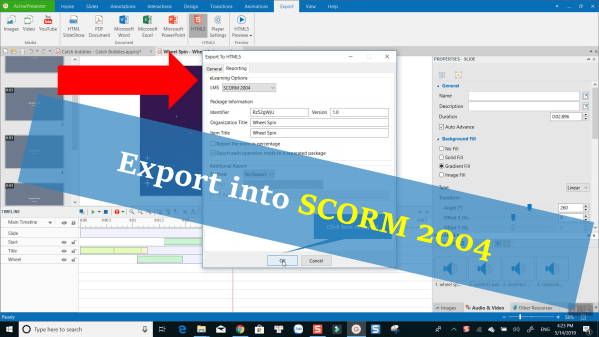
How to: Export an eLearning Project into SCORM 2004, upload to LMS with ActivePresenter 7
How to: export elearning projects into SCORM 2004, upload Zip file to an LMS using ActivePresenter 7.
Converting Text-to-Speech in ActivePresenter 7 Video Tutorial
How to use text-to-speech in ActivePresenter. Check out this tutorial video to learn more.
How to use Chroma Key/ Green Screen Effect in PowerDirector 17?
This tutorial video will show you how to use chroma key/ green screen effect in PowerDirector 17, latest version of CyberLink PowerDirector video editing suite.